Feeling a bit lost seems to get worse the more I read.
Here is my current plan of action;
We have an install with 2008 SQL Express on a 2008 R2 sp1 server.
Main Orion Server Details
Orion
Version 2016.2.100 (why doesn't the Orion platform show up in the upgrade adviser and how does upgrading it fit into this plan? The products themselves are each part of a platform version?)
NPM
Version 12.0.1
IVIM
Product Name Integrated Virtual Infrastructure Monitor
Version 2.1.2
IPAM
Product Name IP Address Manager
Version 4.3.2
NetPath
Version 1.0.1
NTA
Version 4.2.1
Upgrade adviser path
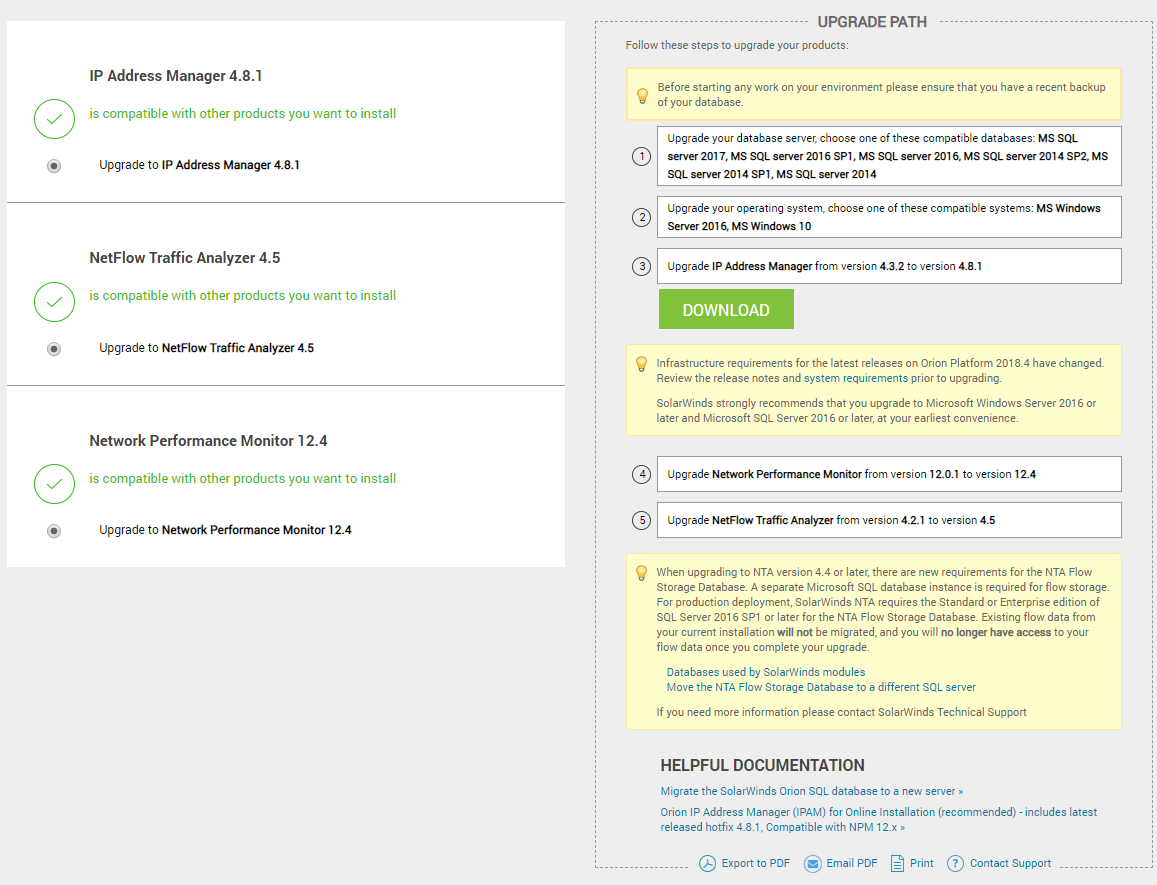
This is based off of the guide for a 'new server using the same IP and hostname'
would it be easier to go with a new ip and hostname since everything is on one server?
We have one agent on a sql server.
Current plan
Upgrade the DB first
- Make a snapshot of the NPM server
- Stop Orion services
- Backup SQL db, (having lost the sa password, I'll be changing that password to accomplish this)
- Have DBA Restore backup on new sql server
- Run configuration wizard to update location for db
- Start services, make sure everything works
Upgrade the products - new server, same name and IP
- Build new server (done)
- Backup the db
- Deactivate licenses via web based license manager
- Stop all Orion services
- Power down old server
- Power up new server - change name and IP
- Install latest products in order as suggested in upgrade adviser based on this post
- Create/configure NTA flow storage db (I assume I will need a DBA to make another db for this)
- re-initialize license store
- enable products licenses