I want to completely exclude a number of my Cisco routers configuration from been backup.
Hi,
Do you want these devices not to be managed by NCM at all (and continue to be montored by NPM etc.), or you just don't want to back up the configuration but leave them in NCM?
Regards,
Jiri
If you are talking about the Backup job in NCM, just go to your NCM server, open NCM and then go to Schedule and select Display/Edit Jobs. Then double-click on your backup job (Nightly Config Backup). Click the Nodes tab, and then select either "Specify Nodes Directly" or "Specify a Selection Criteria". If you do "Specify Nodes Directly", you will have to select every device you want the config from. If you select "Specify a Selection Criteria", click Add Condition and select Simple Condition. Then revise the statement below "Select Nodes where all of the following apply" to read "Where Node Name is not equal to...." then select the node you do NOT want the config backup from. Repeat this for each node you don't want the config backup for.
Jiri,
We have recently install Solarwinds and it was set up to automatically add all the devices into the NCM for backup. Hence we have a lot of backup failure. We have now changed the default so that we have to select whether we want to backup the Cisco router configuration.
The next job is to remove those Cisco routers which are own and manage by 3rd party telecom organisation from the nightly backup. However we still want stats from these routers because we have SNMP read access.
Tony Isles...
Tony,
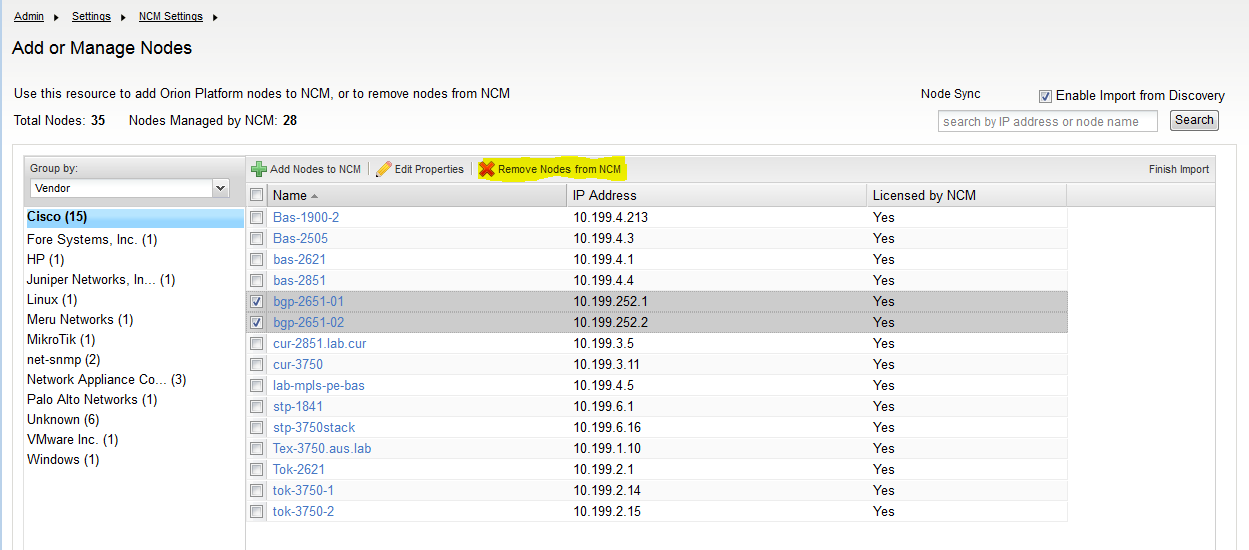
It looks like you want to remove those device from NCM completely. This can be done in Settings -> NCM Settings -> Add or Manage Nodes.
There you can select the nodes you don't want in NCM and click on "Remove Nodes from NCM".