i'm triying to download the running config from the ASA 5520 but i allwas got this error
Connection Refused by <ASA IP ADDRESS>
the issue was that the Server was not allowed to connect to the ASA using the SSH or the Telnet so i configure it using
ssh source_IP_address mask source_interface
thank you all for your help
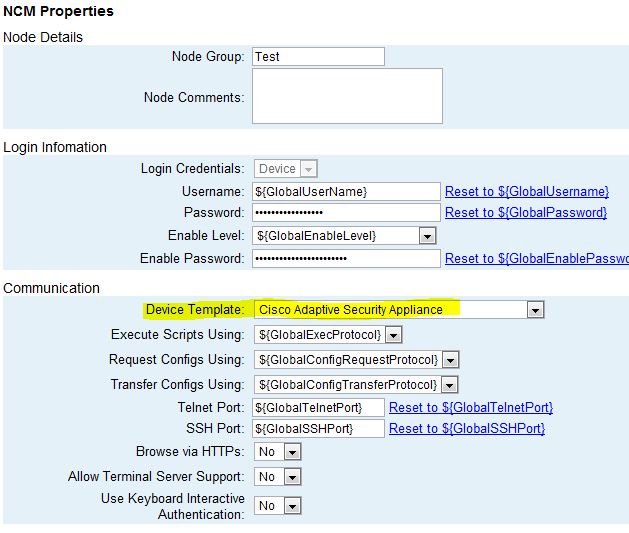
First make sure you've added ssh or telnet access permissions for your NCM server's IP address to the ASA. Also, if you haven't tried changing the device template the ASA is using, try that to see if it gets you connected. If you go to the properties page for the ASA and scroll down to the NCM Properties, there is a Communication section. The first item listed is the Device Template and it has a drop down list. Try changing the template from Auto Determine to Cisco Adaptive Security Appliance. Hope this helps!
Also, if you are running 8.4.x and trying to connect to the outside interface, you can no longer use Telnet. Only SSH, snmp, and HTTP will work to an interface with a security level of 0.
You might also try setting the Enable Level in the Login Information area to "Enable" . That seemed to work for us.
Thank you for posting this, and it worked changing from "enable 15" to just "enable". I was stumped why NCM seemed to be connecting successfully, but not downloading the config with the "connection refused" error showing. If anybody else is comparing notes, this is what the SSH debug looked like from the ASA side while experiencing the issue:
SSH2 1: shell request
SSH2 1: shell message receivedSSH1: TCP read failed, error code = 0x86300003 "TCP connection closed"
SSH1: receive SSH message: [no message ID: variable *data is NULL]
SSH1: Session disconnected by SSH server - error 0x00 "Internal error"