Community
Command Central
MVP Program
Monthly Mission
Blogs
Groups
Events
Media Vault
Products
Observability
Network Management
Application Management
IT Security
IT Service Management
System Management
Database Management
Content Exchange
SolarWinds Platform
Server & Application Monitor
Database Performance Analyzer
Server Configuration Monitor
Network Performance Monitor
Network Configuration Manager
SQL Sentry
Web Help Desk
Free Tools & Trials
Store
Home
Products
Network Performance Monitor (NPM)
Advanced SQL report
Cygnuz
Hi,
Excuse me for my bad english;
I'm not an SQL guru but anyway I made a report in SQL (Wow);now I want to make this report use only data from last monthly . How can I do that?
Watching the reports that come with Orion I can se this time limitation:
SELECT .....
FROM .....
WHERE
( DateTime BETWEEN 37893 AND 37922 )
but I think that 37893 and 37922 are just dates in numerical format. So They does't update every month!
any help is appreciated
Find more posts tagged with
Accepted answers
All comments
Network_Guru
Have a look at these posts:
www4.solarwinds.net/.../topic.asp
www4.solarwinds.net/.../topic.asp
-=Cheers=-
NG
BakerD
I was going to start a new thread, but then came across this one with a similiar name I would have used, so I will just add on.
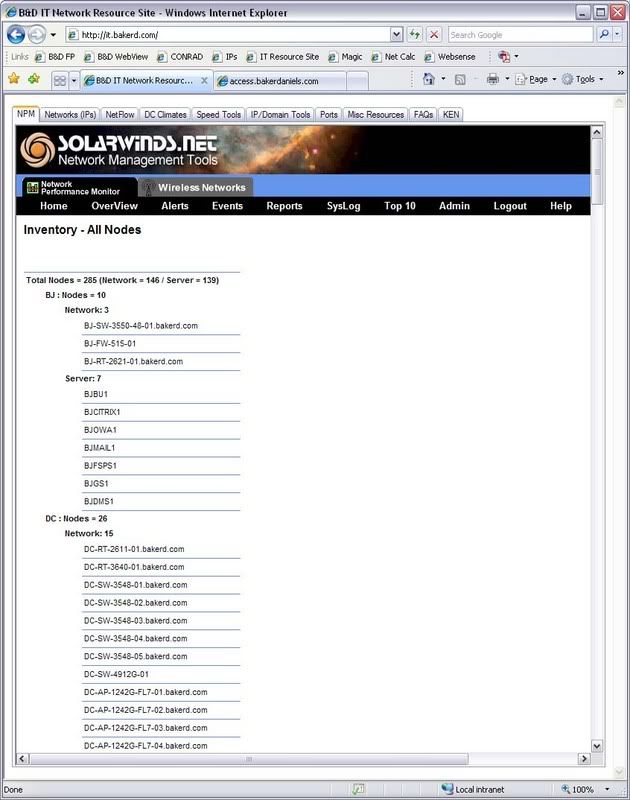
We just came up with a Inventory report that is very useful to us that I would like to share. It is an Advanced SQL Report. It lists all our nodes and names. It gives you the overall total, site total, and breaks it down between network and server. You could take this idea or SQL command and change it to your needs.
Here is the SQL command: Line breaks may not be correct after pasting this in a smaller window.
**************************************************
Select
'Total Nodes = ' + cast((select count(*) from nodes WHERE typei = 'network' or typei='server') as varchar) + ' (Network = ' + cast((select count(*) from nodes WHERE typei = 'network') as varchar) +
' / Server = ' + cast((select count(*) from nodes WHERE typei = 'server') as varchar) + ')' as companytotal,
case isnull(typei, '')
when 'network' then 'Network: ' + cast((select count(*) from nodes n2 where n2.locationi =n.locationi and typei='network') as varchar)
when 'server' then 'Server: ' + cast((select count(*) from nodes n2 where n2.locationi =n.locationi and typei='server') as varchar)
else ''
end as devicetotal,
n.locationi + ' : Nodes = ' + cast((select count(*) from nodes n2 where n2.locationi =n.locationi) as varchar) as officetotal, n.caption
From Nodes n WHERE typei = 'network' or typei = 'server'
**************************************************
Then under the Report Grouping tab I have in the following order:
companytotal
officetotal
devicetotal
Also one thing to note, we created two customer property fields using the Custom Proptery Editor for this, locationi and typei. Location is our site and Type is either network or server.
Quick Links
All Categories
Recent Posts
Activity
Unanswered
Groups
Help
Best Of