Is there a way to run a report that shows the total number of interfaces per device? I don't need to see all the details, just switch6509-a has 336 interfaces.
Anyone out there or at SW have a SQL Query for this?
I would like to see this as well.
Edit: I posted first before noticing this thread was for NCM, then deleted my post, but figure I may as well leave it here if anyone wants to do this in NPM.
Bit of a thread revive but you can try the following (I'm not a SQL DBA or anything so I don't know if there is a more efficient method). This will sort by descending interface count (highest count first) and then alphabetical for identical number of interfaces.
SELECT DISTINCT(Interfaces.NodeID), Nodes.Caption, COUNT(Interfaces.InterfaceID) AS InterfaceCount
FROM Interfaces LEFT JOIN Nodes ON Interfaces.NodeID = Nodes.NodeID
GROUP BY Nodes.Caption, Interfaces.NodeID
ORDER BY InterfaceCount DESC, Caption
You could count by the Nodes.Caption but using the NodeID column will make the nodes linkable in the report (you can hide this column in the report formatting).
For just the node caption and interface count, you can use:
SELECT DISTINCT(Nodes.Caption) AS Caption, COUNT(Interfaces.InterfaceID) AS InterfaceCount
GROUP BY Nodes.Caption
Is there anyway to get the total number available if they are not monitored in NPM? a device poller to node?
Hi everyone!
In order to create a report like:
Node name | Port count
Follow the steps below:
Hope that helps!
Wow, old question brought back to life...
Ok, I actually went through this a bit and here is the basics of it. In NPM proper there are two tables that you might be able to glean this info out of. The Interfaces table and the NodePortInterfaceMap, however both of these have their own problems in that Interfaces only has managed interfaces in it, and NodePortInterfaceMap has probably too complete info. ie: It will have a separate listing for each port/vlan combination, so if you have a switch that has 100 VLANs trunked on 1 port, you will get 100 listings for that port.
On the other hand, I got pretty good results out of NCM, which does an inventory of each device that is in NCM. The NCM.Interfaces table should then have a listing for every port on a switch, which is what you want. It's paring down the list a bit that gets difficult. There is a column called "PhysicalPort" which is misleading, it will list some Ethernet ports as not physical, not sure why that is. I had pretty good results, for switches at least, weeding out the ports with "virtual" in the type.
Came up with this query as a result, pretty basic but seems to work pretty well... Note that this is a SWQL query, not SQL... Can use this either in a report, or on a regular page by adding a resource of type "Custom Query"..
SELECT COUNT(InterfaceDescription) AS NumPorts, N.Caption
FROM NCM.Interfaces I JOIN Orion.Nodes N ON (I.Node.CoreNodeID = N.NodeID)
WHERE NOT (InterfaceTypeName like '%Virtual%')
GROUP BY N.NodeID, N.Caption
ORDER BY NumPorts DESC
HTH!
cnorborg
I have set this up as a Custom Query Resource on my Configs Tab. It does a good job a counting the ports but I seem to have one more extra port on my devices. I am looking at my WS-2960G-8TC-L and WS-C3550-12G switches. I am getting 9 and 13 ports respectively. Thoughts?
Yea, quite often it will include the Null interface, doesn't bother me much, but try this instead...
WHERE NOT ((InterfaceTypeName like '%Virtual%') OR (InterfaceTypeName = 'other'))
That works. It even includes sub-interfaces which is fine with me since I use them a lot.
Good work!
The one additional port is the loopback I modified Craig's query to remove the loopback and the report shows all physical interfaces.
WHERE NOT ((InterfaceTypeName like '%Virtual%') OR (InterfaceTypeName = 'other') OR (InterfaceTypeName like '%loop%'))
Ok, I am taking each type of interface and configuring a Custom Query in a new View so I can look at a glance to see how many on a single device.
Question: I would like to be able to do an Enterprise Wide port type count per port type (Ethernet, FastEthernet, GigabitEthernet, TenGigabitEthernet, Loopback, and Tunnel)
Not saying it can't be done, but it will probably require a lot of work and full SQL... There are multiple problems, the first being that Orion doesn't group interfaces with the types your thinking of above. Instead its grouped by types like "EthernetCsmacd", "other", "propVirtual", "l2vlan", "ieee80211", "bridge", etc..
From this you might notice that there is no distinction between a (|Fast|Gigabit|TenGigabit)Ethernet ports, they're all "EthernetCsmacd", and while "other" does include "Loopback", it doesn't spell it out. You could work off the interface description if you could pare off everything after the first numeric value I think, but while SWQL has a substring function, it doesn't have a strlen or charindex or even regular expressions. So, with SWQL you'd end up with something akin to this, which might be useful to you, but I'm guessing not.
SELECT N.Caption, I.InterfaceTypeName, I.InterfaceSpeed, COUNT(I.InterfaceTypeName) AS NumPorts
GROUP BY N.NodeID, N.Caption, I.InterfaceTypeName, I.InterfaceSpeed
ORDER BY N.Caption
Gets a bit more complex in SQL, and this probably still isn't the desired results... For one, it was erroring out on some type of interface that doesn't have a number in it, so I put in a WHERE clause that looks for a number in the description, quick cheat but should probably figure out what the number is. It also does one line per port-type, rather than putting it in columns. There is probably a way to fix it, but didn't want to spend too much time figuring it out, esp. when you can pop the results in Excel and probably get what you want quicker. But should give you a quick start. Also a nice illustration of things you CAN do in SQL but can't in SWQL...
SELECT N.Caption, LEFT(I.InterfaceDescription, (PATINDEX('%[0-9]%', I.InterfaceDescription)-1)) AS Description,
COUNT(LEFT(I.InterfaceDescription, PATINDEX('0', I.InterfaceDescription))) AS NumPorts
FROM NCM_Interfaces I
JOIN NCM_NodeProperties NP ON (I.NodeID = NP.NodeID)
JOIN NodesData N ON (NP.CoreNodeID = N.NodeID)
WHERE (I.InterfaceDescription LIKE '%[0-9]%')
GROUP BY N.NodeID, N.Caption, LEFT(I.InterfaceDescription, (PATINDEX('%[0-9]%', I.InterfaceDescription)-1))
Ah, I see one other thing it really fails on, inconsistency between vendors in the "InterfaceDescription" field. On Cisco's you always get the long description of the Interface, which is nice, but on other vendors like Fortinet, you get what they named the interface, kind of the Alias in Cisco. Annoying...
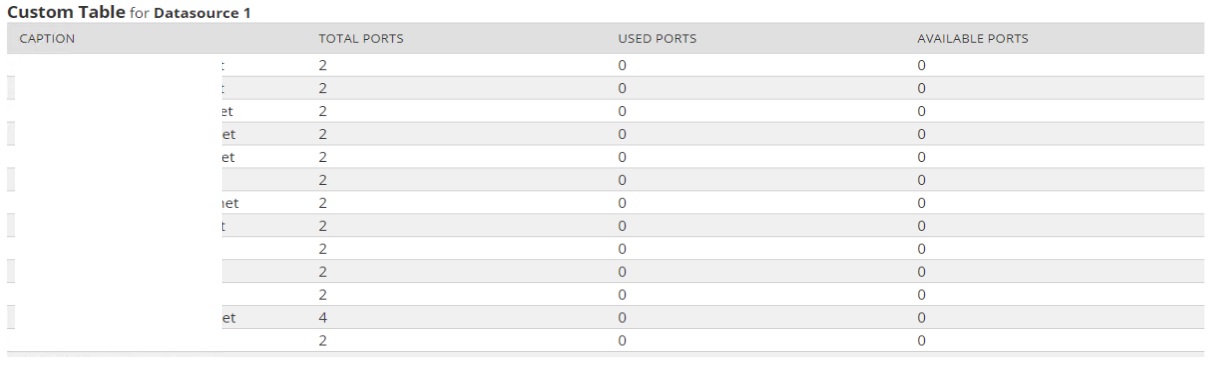
Here is a SQL query to identify total, used and available physical ports. You can modify the WHERE (InterfaceTypeDescription like '%ethernet%') statement to include whatever interface type you need to report on.
SELECT NodeID, Caption,
COUNT (*) AS "Total Ports", SUM (IsUp) AS "Used Ports", SUM (IsDown) AS "Available Ports"
FROM (
SELECT ND.Caption, ND.NodeID,
CASE WHEN OperStatus = 'Up' THEN 1 ELSE 0 END AS IsUp,
CASE WHEN OperStatus = 'Down' THEN 1 ELSE 0 END AS IsDown
FROM NCM_Interfaces NCMI INNER JOIN NCM_NodeProperties NCMNP ON (NCMI.NodeID = NCMNP.NodeID)
INNER JOIN NodesData ND ON (NCMNP.CoreNodeID = ND.NodeID)
WHERE (InterfaceTypeDescription like '%ethernet%')
) T1
GROUP BY NodeID, Caption
ORDER BY Caption DESC
The output looks like:
vispetto working on your latest entry but running into a query to the solarwinds Information Service error. Going through the code looking for misspellings and extra characters.
Was wondering one thing....
I can use the script
But one thing I would like to add here, and don´t know how to.....
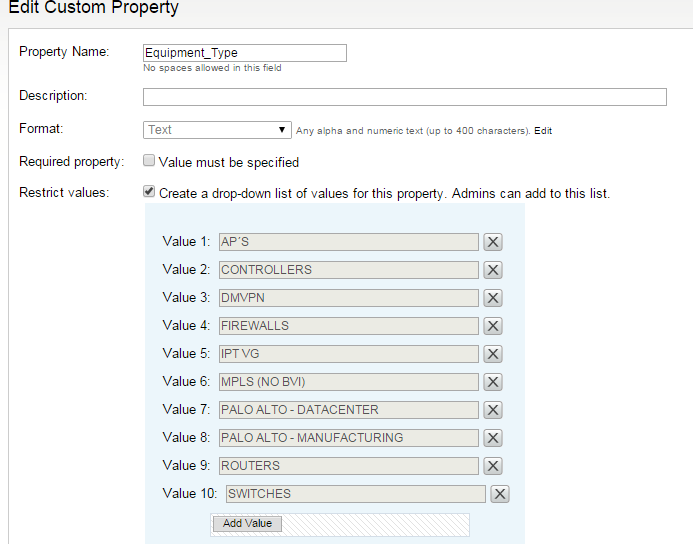
I have made some custom property that I would to have this filter after, since I would only like to see my switches.
Is there any way that I can make some filter on this matter also???
Great work be the way.
osberg
I think you only need to join the custom properties table (line 3, below), and then add the custom property field to filter (line 5, below).
SELECT COUNT(InterfaceDescription) AS NumPorts, N.CaptionFROM NCM.Interfaces I JOIN Orion.Nodes N ON (I.Node.CoreNodeID = N.NodeID)JOIN Orion.NodesCustomProperties AS NCP ON N.NodeID=NCP.NodeIDWHERE NOT ((InterfaceTypeName like '%Virtual%') OR (InterfaceTypeName = 'other') OR (InterfaceTypeName like '%loop%'))AND NCP.Equipment_Type='SWITCHES'GROUP BY N.NodeID, N.CaptionORDER BY NumPorts DESC
Thank you,
-Will
CourtesyIT SQL query ran without errors for me...
Thanks for your help here Will, it works like a charm... And now i know how to make more filter here if needed.
Great work...
@vispetto Thank you. When I execute this I get the total ports correctly but used and available ports show as 0 for all results. Can you help pls?
It worked after I changed Up to numeric 1 and down to 2
CASE WHEN OperStatus = '1' THEN 1 ELSE 0 END AS IsUp,
CASE WHEN OperStatus = '2' THEN 1 ELSE 0 END AS IsDown
This works gr8. Here I also want to know the status for the ports like UP or Down. How can i include that.
Is it also possible to add type of Switch like stack, agrregate, OOBS etc?