DISCLAIMER below - please review the script in it's entirety before running in your environment.
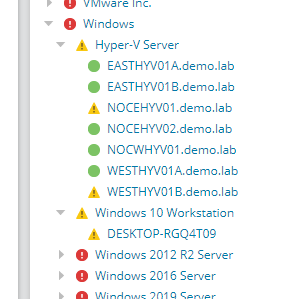
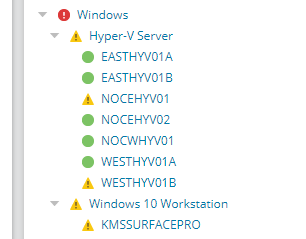
I, for one, do not like long caption names. For the Orion web display, I much prefer short names. But after each network discovery, I'm always going in and editing them over and over again to fix it. I decided to automate this using the Orion SDK.
The below script looks for captions that end in "demo.lab" and update the captions to use my preferred naming scheme.
Before:
After:
When you run it, it will show you the captions it plans on changing.
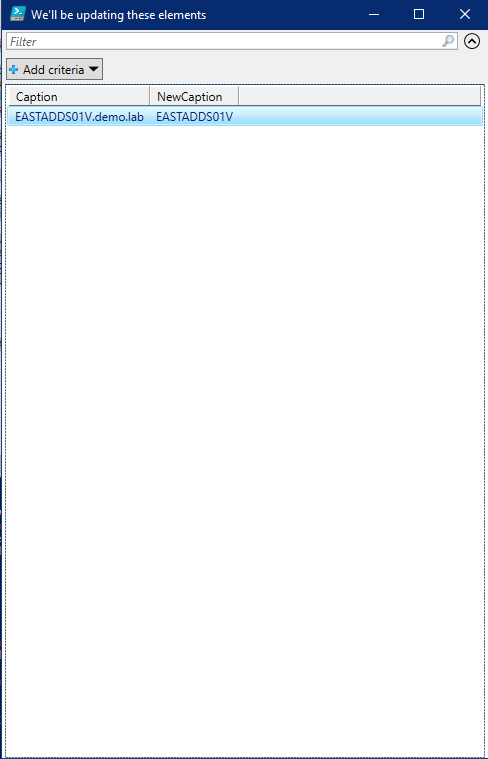
Then you can close that list and answer "y" to change them.

Then it updates them all

For completeness, here is the script.
<#
# TrimDomainFromCaptions.ps1
# Author: Kevin M. Sparenberg (KMSigma [https://thwack.solarwinds.com/t5/user/viewprofilepage/user-id/6])
#
# I personally don't like full domain names in for my caption names.  As such, I normally run something like this to "cleanup" the names.  it can easily be run multiple times for different domains.
#

#>

$DomainMatch = "demo.lab"

Import-Module -Name SwisPowerShell -ErrorAction SilentlyContinue

if ( -not ( $Swis ) )
{
    $Swis = Connect-Swis -Hostname "HostOrIpHere" -UserName 'UsernameHere' -Password 'P@ssw0rdH3r3'
}

# The query logic is as such:
#   Give me the Caption, NodeID, DNS-resolved Name, and URI
#   for all nodes
#   where the caption matches 'something.$DomainMatch'
#   and it's not being polled by ping or external (ie. it is Agent, WMI, or SNMP)

$NodesWithFullDomains = Get-SwisData -SwisConnection $Swis -Query "SELECT Caption, NodeID, DNS, Uri FROM Orion.Nodes WHERE Caption LIKE '%.$( $DomainMatch )' AND ObjectSubType NOT IN ('ICMP', 'External')"

# This is more advanced PowerShell, but I'll explain it here:
# The "Add-Member" function adds a new "column" to the NodesWithFullDomains variable.
# This column is called "NewCaption" (Name) and it's value is calculated ( ScriptProperty type ) from the existing objects ( $this.Caption.Split(".")[0].ToUpper() ).
$NodesWithFullDomains | Add-Member -MemberType ScriptProperty -Name "NewCaption" -Value { $this.Caption.Split(".")[0].ToUpper() } -Force

# Display all the things we'll change
$NodesWithFullDomains | Select-Object -Property Caption, NewCaption | Out-GridView -Title "We'll be updating these elements" -Wait
# Ask if we are good to go.
$GoNoGo = ( Read-Host "Are we good to proceed? [Y/N]" ).ToLower()

if ( $GoNoGo -eq 'y' )
{
    # Cycle through each entry in our list and figure out a better caption name for it
    ForEach ( $Node in $NodesWithFullDomains )
    {
        Write-Host "Updating $( $Node.Caption ) to $( $Node.NewCaption ) " -NoNewline
        # This is the line doing the work
        Set-SwisObject -SwisConnection $Swis -Uri $Node.Uri -Properties @{ Caption = $Node.NewCaption }
        Write-Host "[UPDATED]" -ForegroundColor Green
    }
}
else
{
    Write-Host "No changes were made." -ForegroundColor Yellow
}
DISCLAIMER: I make no claims that this will work 100% in your environment. This has been tested with Orion platform products 2020.2. Please test in a development environment before executing in production.