After learning a little bit about the Geocoding API and using it to obtain a list of latitude and longitude coordinates, I wanted to take a step forward and apply it to automate the creation of points for the Worldwide Map. If you saw the previous document, Obtaining Lat/Long Coordinates Using Google's Geocoding API, and checked out Loop1's GitHub repo, you might have already seen this script. Here is the thinking behind it.
Prerequisite:
- Create a nodes custom property called "City" and populate it with the location of each node. For example, "Austin, TX".
Script:
- Get a list of all the unique values currently set for the "City" custom property.
- For each city, send a request to the Geocoding API to get the latitude and longitude coordinates.
- For each node that you wish to add to the map, read the value of its "City" custom property and get the matching latitude and longitude coordinates obtained in the previous step.
- If a point does not already exist for this node, create it.
- If a point already exists for this node, update it. (Maybe it's in a different city now.)
Here is the full script:
$APIKEY = ""

# Verify that the API key is not empty
if ($APIKEY -eq $null -or $APIKEY -eq "") {
     Write-Output "Please provide an API key."
     Exit
}

# Connect to SolarWinds
$swis = Connect-Swis -Hostname "" -Username "" -Password ""

# Query SolarWinds for distinct values in the City custom property
$cities = Get-SwisData $swis "SELECT DISTINCT City FROM Orion.NodesCustomProperties WHERE City IS NOT NULL"

# Geocoding base url
$url = "">maps.googleapis.com/.../json

# hash table for storing response
$cityData = @{ }

# Iterate through cities
foreach ($city in $cities) {
     if ($cityData[$city] -ne $null) {
          Continue
     }

     # build the query parameters
     $params = @{ address = $city ; key = $APIKEY }

     # send API request
     $response = Invoke-WebRequest $url -Method Get -Body $params -UseBasicParsing | ConvertFrom-Json

     # check response status
     if ($response.status -ne "OK") {
          $response.error_message
          Exit
     }

     # add the response to the hash map
     if ($response.results.geometry.location -is [system.array]) {
          $cityData[$city] = $response.results.geometry.location.lat[0], $response.results.geometry.location.lng[0]
     } else {
          $cityData[$city] = $response.results.geometry.location.lat, $response.results.geometry.location.lng
     }
}

# Query SolarWinds for a list of NodeID & City
$nodes = Get-SwisData $swis "SELECT n.NodeID, cp.City FROM Orion.Nodes n JOIN Orion.NodesCustomProperties cp ON n.NodeID = cp.NodeID WHERE cp.City IS NOT NULL"

# Iterate through each node
foreach ($node in $nodes) {
     # Get the lat/long coordinates matching the node's city
     $coordinates = $cityData[$node.City]

     # Query SolarWinds for a matching point uri
     $pointUri = Get-SwisData $swis "SELECT Uri FROM Orion.WorldMap.Point WHERE InstanceID = $($node.NodeID) AND Instance = 'Orion.Nodes'"

     # If no point exists for this NodeID
     # create Orion.WorldMapPoint
     if ($pointUri -eq $null) {
          "creating point for node $($node.NodeID)"
          $pointProperties = @{
               Instance = "Orion.Nodes";
               InstanceID = $node.NodeID;
               Latitude = $coordinates[0];
               Longitude = $coordinates[1];
               StreetAddress = $node.City;
          }

          New-SwisObject $swis -EntityType "Orion.WorldMap.Point" -Properties $pointProperties | Out-Null
     }
     # If a point exists for this NodeID
     # Update Orion.WorldMapPoint
     else {
          "updating point for node $($node.NodeID)"
          $pointProperties = @{
               Latitude = $coordinates[0];
               Longitude = $coordinates[1];
               StreetAddress = $node.City;
          }

          Set-SwisObject $swis -Uri $pointUri -Properties $pointProperties
     }
}
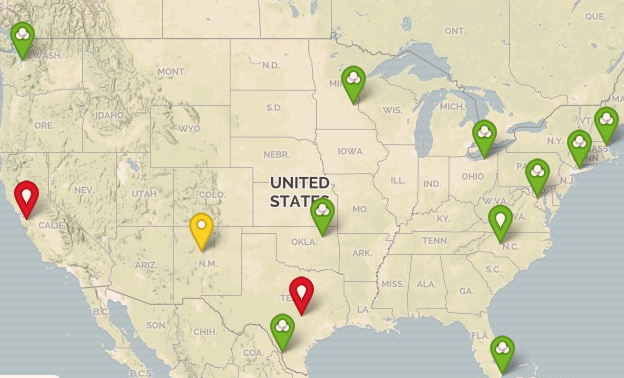
And my resulting map:
Possible Modifications:
- Use a specific address instead of just the city.
- Use the location node property instead of creating a custom property.
- Apply this to groups instead of nodes.
----------------------
Ana Cruz
Loop1 Systems
