my solarwinds server got shut automatically?? is something related to the number alerts on desktop console ??? i'm confused..
There are no limitations to the number of alerts. If you were disconnected, there was either a problem with a connection to the appliance from the console, or something happened at either end (appliance or workstation).
It is possible if your workstation is underpowered to get overwhelmed by the LEM console, but there's no hard and fast rules. You could try the browser-based Console, a lot of people prefer it.
i'm not using any workstation i'm just accessing VMware hypervisor through a vphere client ??? is it something i need to worry about ???
If your VM unexpectedly shut down, that seems odd, yes. There is nothing built-in to the appliance to shut it down. The only ways it'd be shut down would be for the VM to get powered off in vSphere or for someone to issue a 'shutdown' command to the appliance via the vSphere console.
have you used the keys "STR + ALT + DEL" while the console window of LEM was still active ? (e.g. because you wanted to get out of the console window) This would force Linux in ESX to do a reboot...
no i din't
I've got 35 nodes up so far, and I've had the web console hang but the server will still be running. It just keeps loading the web or console so not a crash.
At that time I'm also not able to activate new nodes. So, I assume one of the LEM Server services hangs up.
I then have to go into the vsphere console and reboot. Last time I just waited it out and about 12 hours later the web console was back functioning.
I'm on 5.4.
Hey John,
When that happens, do you still see alerts being processed in your console (if you stay logged in), or receive notifications if you've got them set up?
A wild stab could be a resource issue, where the LEM appliance needs to be assigned different fixed resources. You might check with support and see if they can help troubleshoot/diagnose, it doesn't sound right.
Console traffic stops, I can move around the web session I have open still, but user logons for example are no longer getting new entries. If I close that browser tab and reopen, it just never loads again.
As for resources, it comes as an VM appliance with pre allocated resources..... so yeah.
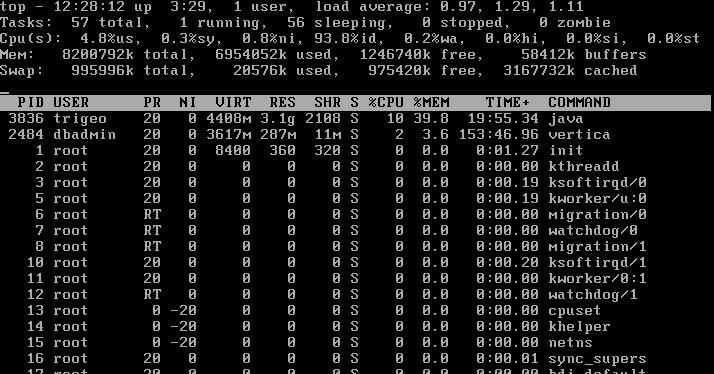
Looking at top though, it's not bad. Load peaks at around 1... right now it's been at 0.08 for the past min... .77 past 5...
So, not killer.
Waiting on storage is 0% or 0.3%, I've check the backend and I'm averaging around 4ms from disk..not great but pretty damn good. little spikes into 8ms.
CPU for user is staying below 5%.... I do see CPU % for NI spike every now and then.... it's pretty light right now.... I mean, it's 35 nodes.... nothing crazy.
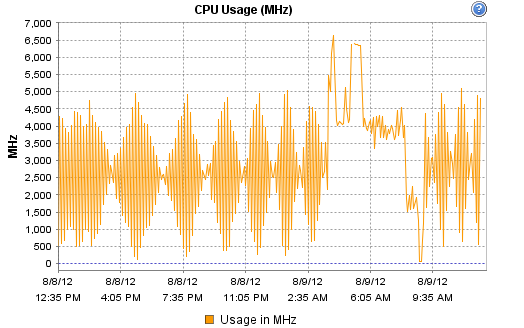
I do however find this interesting. I had a massive CPU spike late a night, I'm guess database clean up.
Then back down...and the big dip is where I had to reboot. Noticed just before that when hung CPU useage was way down.
Yeah, I'll have to open a ticket on this one...
Just checked the VM's config to and I'm really not worried about the load averages b/c it's configured with 2 vCPUs.
8GB RAM
250GB Storage.
It's consuming 4986 Mhz
8246MB Memory which 4259MB is active.
Still crashes about every 2 to 3 days.
Which begs the question can we at least get to the shell and cron to schedule a reboot every night or so?
We keep the web console open for a montior user at our monitoring IT station.