migrating to a new server for Orion and wondering if there is anything special that needs to be done for he licenses or if i can just shut the old one off and put the licenses on the new one and keep on trucking.
Barring anything going wrong, that's exactly what you need to do.
sweet thats what i thought just wanted to ask the experts here,.
As a quick followup - I've seen it go wrong once, and that just took a quick ticket to SW to clear up.
Make sure to use the license manager to release the licenses off the old server prior to shutting it down. This is becoming a somewhat "common sense" step for people that they may assume is getting done, but I've seen a number of folks get burned by that.
Good catch, I've gotten so used to unparking 'em that I'd _assumed_ that is what Aaron was referring to.
oh yeah knew about releasing them did it with VNQM when we went from he eval license to the permanent one.
HI mharvey, would you mind, providing the steps for releasing licenses? Thanks,
ZibaK heres the write up i just did hope it helps.. its titled license activate walkthrough should be two depending on if you want pictures or just a write up.
https://thwack.solarwinds.com/community/network-management_tht/orion-network-performance-monitor/content?filterID=contentstatus[published]~category[general]&filterID=contentstatus[published]~objecttype~objecttype[document]
Hi All,
License migration is a very easy steps produced by solarwinds in above platform Orion Platform 2016.2.X
Because currently all license you can manage by web console.
License key deactivation process-
just log into Orion console:-
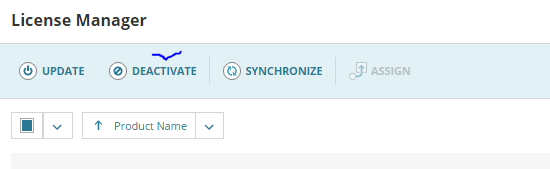
> Go to setting - License Manager (Open this)
Actually in a latest version of solarwinds all license being handle and manage by web console
> Select the license which you want to migrate in a new server (you can select at a time all license that you want to migrate or one you want to migrate in to new server)
> Click on DEACTIVATE
> Once you click on deactivate, one new wizard will open for confirmation.
> you can copy all deactivated license key into notepad for reference and save in desktop on separate place, because same deactivated license key will be use later for activation the license into new server.
Activation Process -
> Open a saved notepad file for activation the license into new build orion server.
Now below steps you can use for license activation new migrated server.
> Click on assign and add the one by one all license key from your saved notepad file (deactivated license key notepad file) with your contact details like email, contact etc and save them.
> After save the form, you will see your license has successfully activated
this steps i used and it worked properly and now all licence has migrated into new Orion server.
thanks