Here is the SQL query that reports on all subnets and show IP address status delta before and after subnet scan.
Customer can select specific subnet by name (uncomment last row or create more sophisticated condition). You can copy this into “custom SQL report” of ReportWriter.
NOTE: I suggest add there condition i.e. to filter that looks for scan performed in last 7 days as maximum history milestone:
…WHERE… subnet.[LastDiscovery] BETWEEN DATEADD(DAY, -7, GETDATE()) AND GETDATE()
SQL QUERY:
SELECT subnet.[FriendlyName] AS 'Subnet Name'
,subnet.[Address] + ' /' + CAST(subnet.[CIDR] AS varchar(8)) AS 'Subnet address /CIDR'
,subnet.[LastDiscovery] AS 'Subnet Last Scan'
,ip.[IPAddress] AS 'IP Address'
,h.[FromValue] + ' -> ' + h.[IntoValue] AS 'Status Changes'
,h.[FromValue] AS 'Status Before'
,h.[IntoValue] AS 'Status After'
,DATEADD(MINUTE, DATEDIFF(MINUTE, GETUTCDATE(), GETDATE()), h.[Time]) AS 'Change Time'
FROM [dbo].[IPAM_Group] subnet
LEFT JOIN [dbo].[IPAM_Node] AS ip ON ip.[SubnetId] = subnet.[GroupId]
LEFT JOIN [dbo].[IPAM_IPHistory] AS h ON ip.[IPNodeId] = h.[IPNodeId]
WHERE
subnet.[GroupType] IN (8,512)
AND subnet.[LastDiscovery] IS NOT NULL
AND h.[HistoryType]=1
AND DATEADD(MINUTE, DATEDIFF(MINUTE, GETUTCDATE(), GETDATE()), h.[Time])
BETWEEN DATEADD(MINUTE, -3, subnet.[LastDiscovery]) AND subnet.[LastDiscovery]
-- AND subnet.[FriendlyName]='127.0.0.0/24'
SAMPLE REPORT:
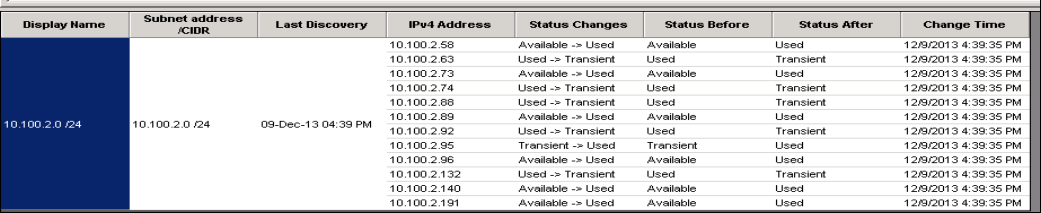
You can add more IP address related data - HistoryTypes and see not only Status chages, but also DNS and MAC:
Simply replace this part of SQL query and instead of AND h.[HistoryType]=1 use AND h.[HistoryType] IN (1,2,..)
Hope that helps.

