Dear Engineers,
thanks to your feedback we were able to fix several bugs in Engineer's Toolset v11.0 beta available! so we've prepared a new Beta II..
As usually, to get the downnload link, you will have to fill our 4-step survey, providing: Thwack ID, email address, valid Toolset license ID and last but not least, confirmation you won't install Beta on a production server...
ETS v11 Beta II. Survey
Apart of these, few more steps may be required depending on your OS version:
For Windows server 2003 you can stop reading, nothing is required 
For Windows 2008 and Vista - please visit: How to enable IIS7/ASP.NET and WCF HTTP Activation - blambert's blog - Site Home - MSDN Blogs
For 2012 servers, follow the steps in the link, just choose .NET Framework 4.5 Features instead of Framework 3.0, like on the image below >>
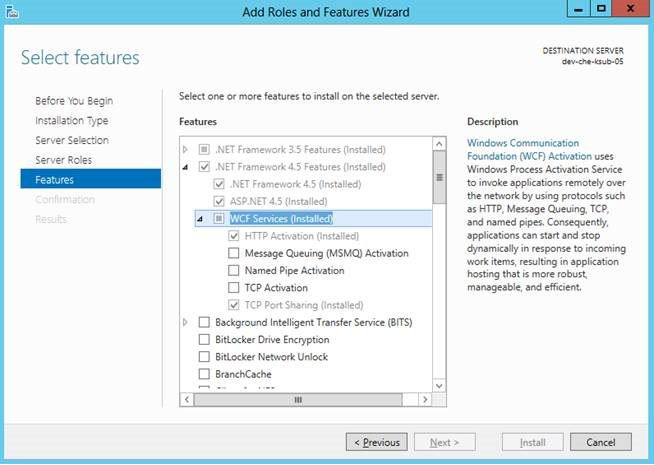
After enabling WCF HTTP Activation, install ASP.NET again and reset IIS in 2008 servers to avoid script module errors, as follows:
C:\>Windows\Microsoft.NET\Framework\v4.0.30319\aspnet_regiis –iru
C:\>iisreset
Looking forward your feedback!
Peter Ksenzsigh
ps: no worries, HTTP activation steps are just temporary and won't be required in a final version