Hi!
I need to generate an alert when an interface belonging to a node in a specific group goes down.
I've worked out the following so far, which shows which group that interface is in.
NOTE: I don't have interfaces added to groups. I am generating this report to display all the interfaces belonging to the Node which is in the group.
This is what I've accomplished so far:
SELECT Intf.InterfaceID,intf.caption as InterfaceCap,co.nameFROM [dbo].[Containers] coleft outer join ContainerMemberSnapshots sn on co.ContainerID = sn.ContainerIDleft outer join [dbo].[Nodes] Nod on sn.EntityID = Nod.NodeIDleft outer join [Interfaces] Intf on Nod.NodeID = Intf.NodeIDleft outer join [StatusInfo] St on Intf.Operstatus = St.StatusIDWHERE Intf.OperStatus <> 1and co.name in ('GRP001','GRP002')ORDER by co.ContainerIDI am only interested in the interfaces that are in the GRP001 and GRP002 groups. Also, I am only interested in interface status which is not up.
This works well:
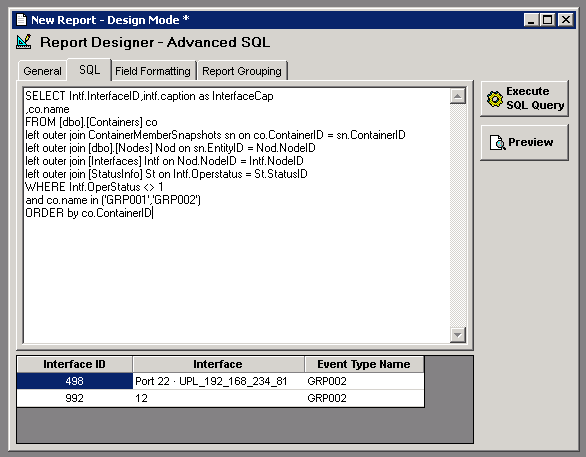
Now here's the issue I am facing. I need to create an alert if an interface in groups GRP001 and GRP002 is not up.
Pasting the query and testing it in Advanced Alert Manager doesn't work as it should because Advanced Alert Manager is not respecting the filter on group.
I presume that is because there's a predefined query that the SQL Alert is executing:
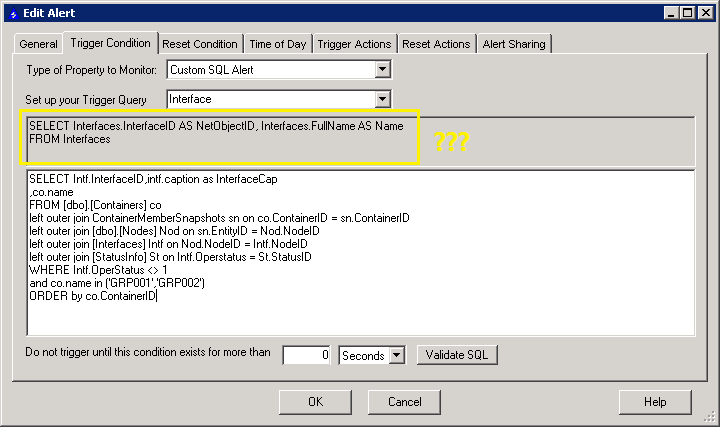
I can confirm this by looking at the TriggerQuery in AlertDefinitionin:
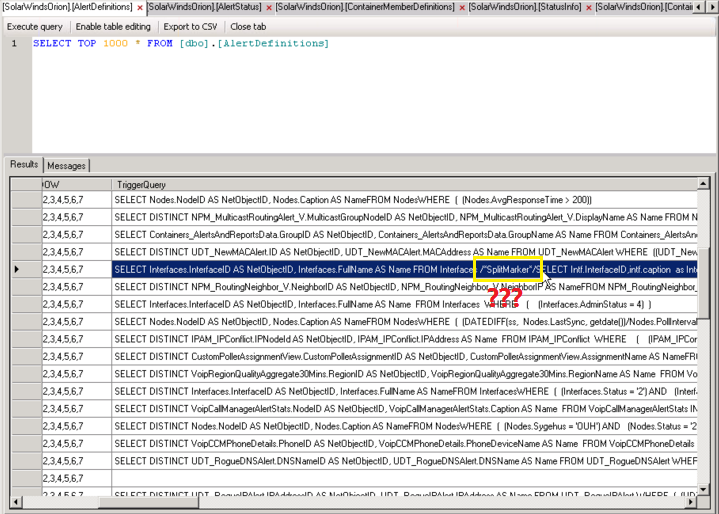
So the question now is, can I create a Custom SQL Alert without there being a predefined query attached to it?
If not, could I safely modify the query in the TriggerQuery column for this alert to only include my own SQL query?
Would this break anything or be reverted at some point (db maintenance, running configuration wizard, updates etc)?