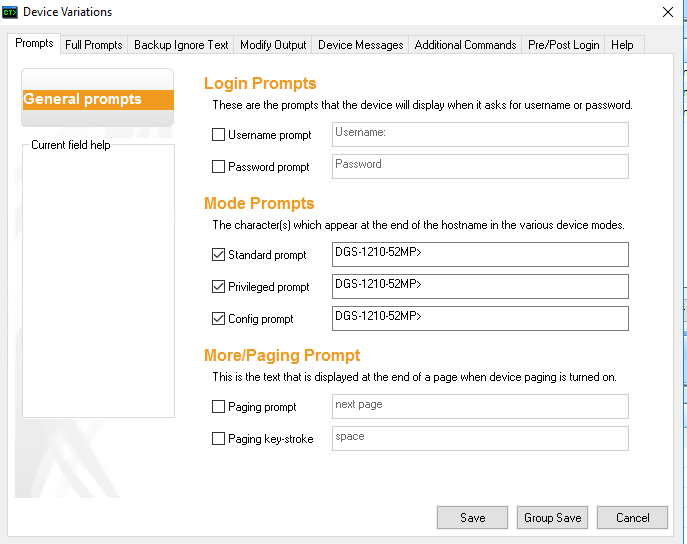
Trying to setup Enterprise DLink switch device configuration backup. Using SSHv2, when I manually launch SSH from the device profile I am able to login, when the script runs we get that error.
That worked, I modified the Mode Prompts variations.
Please do the following:
1. Use the CatTools File menu to select the "Enable capture mode" option.
2. Run the activity you are having trouble with. This should create a debug file in the \CatTools3\Debug folder.
3. Clean up any sensitive data, and post the result here
<NEWSESSION CatTools 3.11.3 2/8/2018 9:50:43 AM>
<PROTOCOL=SSH2>
<DEVICE TYPE=DLink.Switch.General>
<ACTIVITY TYPE=Device.Backup.Running Config>
<ACTIVITY SCRIPT=C:\Program Files (x86)\CatTools3\Scripts\Client.Device.Backup.Running Config.txt>
<USERS NAME FOR DEVICE=DGS-1210-52MP-1>
<C OK 9:50:44 AM>
<R-9:50:44 AM>[13]DGS-1210-52MP>
================================================================================
WFMDRetVal=1 Waiting for: "$"
WFMDRetVal=2 Waiting for: "#"
WFMDRetVal=3 Waiting for: "Username:"
WFMDRetVal=4 Waiting for: "Password"
WFMDBuffer="[13]dgs-1210-52mp> "
It look like we are expecting either a $ or $ prompt, but are seeing dgs-1210-52mp>.
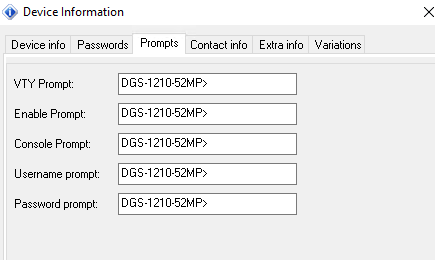
Please edit your device, and go to the Prompts tab. You will want to add dgs-1210-52mp> to these sections. You may need to adjust for enable, config etc.
Let me know if that helps.
Added to all prompts but still get an error. Here is where I modified the prompt:
Debug output:
<D 10:53:17 AM>
<SCRIPT VALUES>
<HOSTNAME="">
<PROMPT VTY="">
<PROMPT ENABLE="">
<PROMPT CONFIG="">
<NEWSESSION CatTools 3.11.3 2/8/2018 10:53:20 AM>
<C OK 10:53:22 AM>
<R-10:53:22 AM>[13]DGS-1210-52MP>
<D 10:55:22 AM>
Edit the device, and delete those from the prompts section. Next click the Variations tab, click Use Variations and then go to Prompts tab and add dgs-1210-52mp> there.