Hi All,
I was recently working on a customer environment where they needed to have two different teams be notified of node alerts, one was a local in-country team (so was different per city) and a core-services team which was different depending on the type of device (ie Server or Network etc).
So I created two Custom Properties called Email_Local & Email_Core and with assistance from the customer, we populated these fields with the appropriate email details based on the site location and service.
I then created a basic status alert for Up/Down alerting - I setup the Trigger Action as Email and in the TO field I entered the Custom Property of ${N=SwisEntity;M=CustomProperties.Email_Local} & ${N=SwisEntity;M=CustomProperties.Email_Core} the system initially accepted the entries and I saved the alert. However, when I went back into the alert it had changed to $ $, so I deleted them and re-added the entries, but when I tried to Execute a test email (Simulate > Execute) I got action failed error:
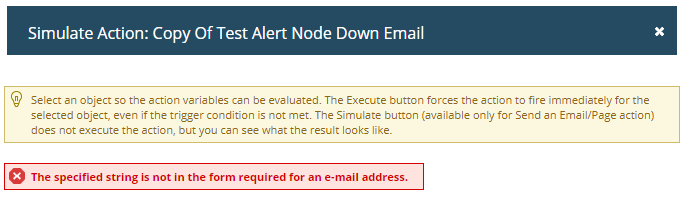
I was able to replicate this in my own lab system, and if you have more than ONE Custom Property in the TO field it fails to trigger, I had to move the second one to CC as a work around but I wonder if this is intended? I saw this issue mentioned in a thread back in Oct 2017 by Detroiter and the response was that it was fixed in the Orion 2017.3 Hotfix 1 labelled:
- Cannot add more than one variable in the mail recipients section in the Send an Email/Page alert action.
- The Manage Alerts page displays $ signs instead of variables.
I wasn't sure if this same issue has reared it's ugly head (The customer environment was running 2018.2 HF3 and my Test system is on 2018.2 HF4 - I will be updating soon to test if this resolves the issue.)
I have raised a ticket with support (Case #00187630), but pending a response I thought I would reach out here.
Thanks
David