Hi there,
We run ipMonitor 10.8.2 and I'm looking to have alerts post into our MS Teams channel. This is a very well documented process for Orion and NPM (and these apps now have native actions for this purpose), but not so for ipMonitor.
I see no reason why the same principles or calling cURL or a powershell script to post to the webhook URL cannot work though, I have got it working with a basic text based template but now need to pass the tokens of the device\monitor to powershell to appropriately post to the webhook. I'd prefer to do this using powershell and this is what I have at the moment.
Action is configured as below
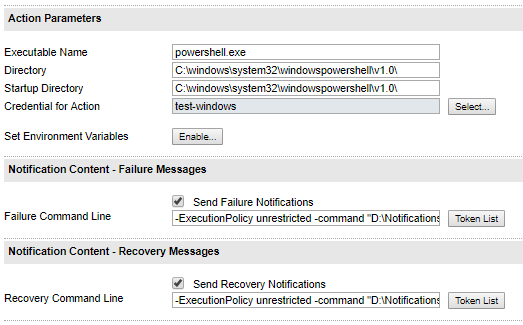
The command line is set up as follows for failure messages, based on this post doing similar from Orion into Slack Slack - Alert Integration - Node . Difference here appears to be to be token names are formated differently.
-ExecutionPolicy unrestricted -command "D:\Notifications\Webhooks\Testing.ps1 '${%devicename%}' '${%devicestatus%}' '${%monitorname%}' '${%monitordowndate%}' '{$%devicevendor%}'"
The powershell script Testing.ps1 then looks like this (with the URI removed),
$uri = ""
$body = @"
{
"@type": "MessageCard",
"@context": "http://schema.org/extensions",
"themeColor": "ff0000",
"title": "ALERT TRIGGER: ${'%devicename%'} is currently ${%devicestatus%}",
"text":"Please investigate as appropriate",
"sections": [{
"activityTitle": "MONITOR: [${%monitorname%}](${%monitordowndate%})",
"activitySubtitle": "Here are further details on the device",
"facts": [{
"name": "VENDOR",
"value": "${%devicevendor%}"
}],
"markdown": true
}]
}
invoke-webrequest -method Post -uri $uri -contenttype 'application/json' -body $body
I can make the above post into the Team channel witht text just fine, it's the dymanic content from the monitor that won't work.
Can anyone tell me what I am missing?
