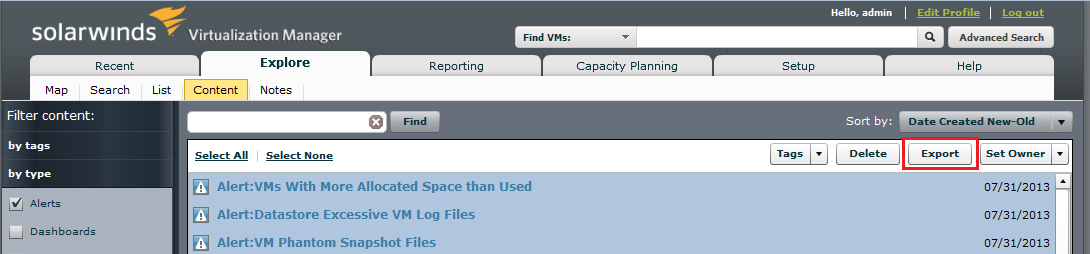
Just installed VM 6 and want to create a report or query , anything that will list all of the current alerts and their descriptions/thresholds.
Hello,
there's an option to export Alerts (and other content) into XML. If you go to Explore - Content menu and filter content by type, you will be able to export all alerts and their details:
Thanks Milan,
Yes I saw that and in fact ran the export but I was really looking for a way to just extract the alert name and what exactly the alert based on. At the end of the day I can go through each alert one by one and manually document this information but I was hoping there was some easy way to create a script that would extract just this information.
In this case you can use this SQL script to extract particular information:
select
name,
cast((xpath('/x:alert/x:searchQuery/text()', (cast(data as text))::xml, ARRAY[ARRAY['x', 'http://www.hyper9.com/analytic-services/1.2.0']]))[1] as text)::varchar as SearchQuery,
cast((xpath('/x:alert/x:dataAttribute/text()', (cast(data as text))::xml, ARRAY[ARRAY['x', 'http://www.hyper9.com/analytic-services/1.2.0']]))[1] as text)::varchar as Attribute
from workspace_file
where
type = 'alert'
-- and datemodified > now() - interval '1 days' -- X days back
Notes:- replace the attributes in bold by requested attributes (extracted from XML document)
- uncomment last row to get just alerts modified last day
- see Thwack thread how to run the script automatically
Should you have any questions please reply to this post.