After adding Interfaces with High Percent Usage You may have following Error.
This error is being displayed in the "Interfaces with High Percent Usage" resource:
There was an error rendering: Interfaces with High Percent Usage
There must have one ore more interfaces with very high % utilization like an example below which resource is unable to load. and spiting the Error.
Example Interface Utilization is below .

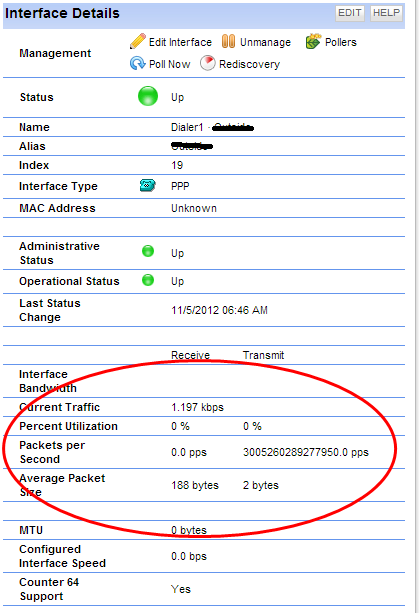
Question how to find the interfaces having such huge utilization .
SELECT * FROM Interfaces WHERE (InPercentUtil > 80 OR OutPercentUtil > 80)
You should be able to see all the interfaces having Utilization above then 80%
Open Database Manager
Start > All Programs > Solarwinds Orion > Advanced Features > Database Manager
If this is the first time you use the tool, add your database server by clicking on the Add server button.
Expand your database and right-click on the Interfaces table.
Select Query Table.
Type the below SQL query:
SELECT * FROM Interfaces WHERE (InPercentUtil > 80 OR OutPercentUtil > 80)
and click on Refresh or execute the query.
You should be able to see the interfaces having such high Utilization
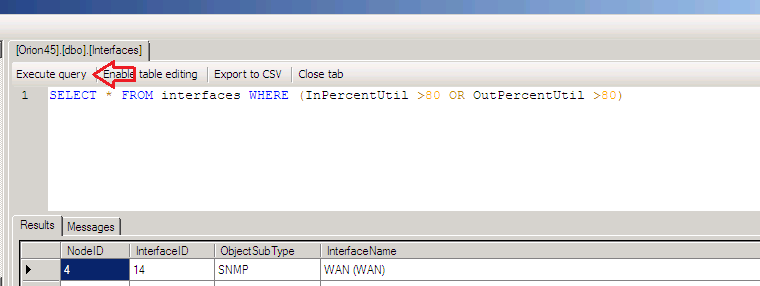
Now remove or Unmanage or Correct the custom bandwidth .
Once done
Issue will be resolved.