Hi all,
I am wondering if it is possible to get a daily report of VMs by Cluster,
can somebody walk me through it if it is possible?
Hello,
you can follow those steps:
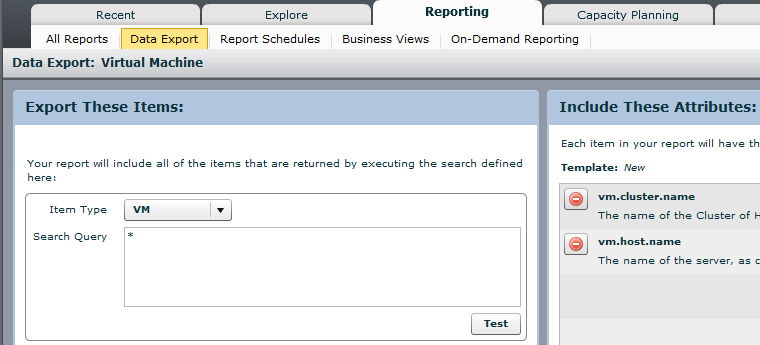
1) in Reporting - Data Export configure Item Type and Search Query (or directly from Search Results module -> Export Results button). Add requested attributes into the right pane, i.e. vm.cluster.name and vm.host.name:
2) run the report via Run Export button
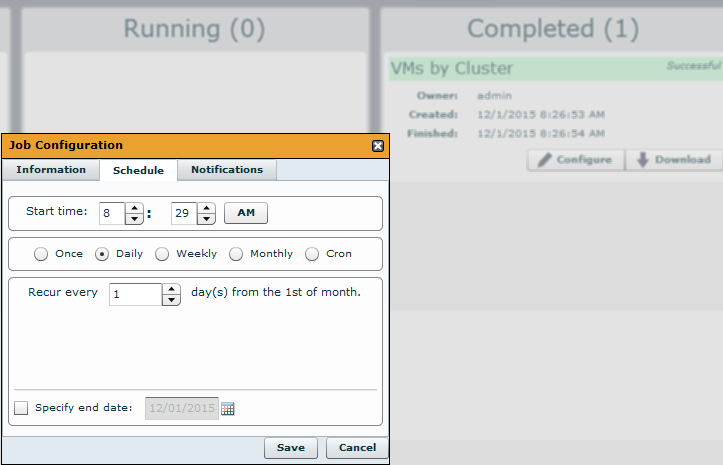
3) as soon as the report is created (under Completed column), press Configure column and set "Daily" repetition on Schedule tab.
If you fill in your email address(es) into "Email To" on Notifications tab, you'll get the reports via email. Further info about Reports is here.
If you don't want to receive the reports via email, you can download them in Explore - Content menu (filtering via "Search by name" or Filter content -> by type -> Reports).
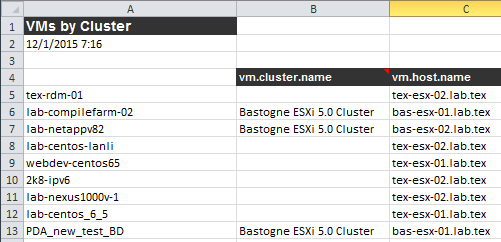
The report should look like this:
Does it help?
Could not find this tab, this is my screen.
Found out how to do it! Went to reports then report manager then Inventor then typed hosted and selected only one there. Individually selected servers. Thank for the help though!