Hello:
I made this template for monitoring MAXDB database on my SAP systems. the template was testing on HP-UX, Linux with MAXDB.
Objective: Monitor MAXDB database.
Description: The template monitoring: data space, log space and status. SAP Orion call the script on my UNIX system.
step to implement
create at O.S level one user, may be: solarw
#adduser solarw
#passwd solarw
the user may be create with this home directory:
/home/solarw
in this directory create tree directory with this names:
bin, logs
mkdir /home/solarw/bin (in this directory live script to monitor maxdb)
mkdir /home/solarw/logs (in this directory live logs for the script)
This are the tree script to app monitor:
Data space:
name:check_maxdb_data
script name:check_maxdb_data
code:
#!/bin/ksh
#Monitor used data space
MAXDB_BIN="/sapdb/programs/bin"
DB_NAME="LDQ" # instance name maxdb
DB_PASS="user,pass" #user and password in MAXDB Database
# Referencias
MAX_DATA=80 # % Critical space level
#command conection
${MAXDB_BIN}/dbmcli -d ${DB_NAME} -u ${DB_PASS} info state > /tmp/db_statesw.log
date >> /home/solarw/logs/db_statesw.log
${MAXDB_BIN}/dbmcli -d ${DB_NAME} -u ${DB_PASS} info state >> /home/solarw/logs/db_statesw.log
#command to extrac data from database
P_DATA=$(/bin/grep -E '^Data *\(\%\)' /tmp/db_statesw.log |awk -F"=" '{print $2}'|sed 's/ //g')
###############################################################################################################
if [ $P_DATA -gt $MAX_DATA ]
then
echo "Space used Critical - $P_DATA%"
echo "Statistic: 0" #Output to solarwinds
else
echo "Space used on DATA MAXDB OK - $P_DATA%"
echo "Statistic: 1" #Output to solarwinds
fi
now copy this script to this route on UNIX server with maxdb database:/home/solarw/bin
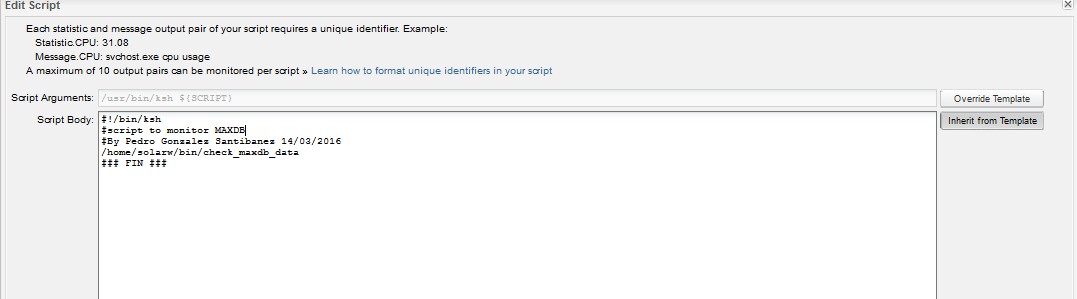
then at Solar wind create the template with bash script UNIX with this caracteristics:


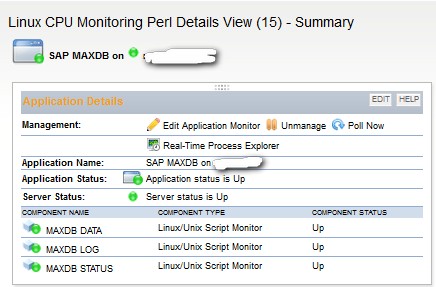
then the monitor work without problems:
to monitor log space and status maxdb use this codes:
LOG space:
#!/bin/ksh
MAXDB_BIN="/sapdb/programs/bin"
DB_NAME="LDQ" #nstance name maxdb
DB_PASS="user,pass" #credential at MAXDB level
MAX_LOG=80 # % critical level
MAX_LOG_W=70 # % warning
#Comando de conexion
${MAXDB_BIN}/dbmcli -d ${DB_NAME} -u ${DB_PASS} info state > /tmp/db_state_log.log
date >> /home/solarw/logs/db_state_log.log
${MAXDB_BIN}/dbmcli -d ${DB_NAME} -u ${DB_PASS} info state >> /home/solarw/logs/db_state_log.log
#command to extract data
P_LOG=$(/bin/grep -E '^Log *\(\%\)' /tmp/db_state_log.log |awk -F"=" '{print $2}'|sed 's/ //g')
###############################################################################################################
if [ $P_LOG -gt $MAX_LOG ]
then
echo "used space log Critical - $P_LOG%"
echo "Statistic: 0"
else
echo "used space log OK - $P_LOG%"
echo "Statistic: 1"
fi
for status maxdb:
#!/bin/ksh
MAXDB_BIN="/sapdb/programs/bin"
DB_NAME="LDQ"
DB_PASS="user,pass"
REF=OK # date >> /home/solarw/logs/db_statedbsw.log
STATE=$(${MAXDB_BIN}/dbmcli -d ${DB_NAME} -u ${DB_PASS} dbm_configset SAPLDP)
echo $STATE
if [ $REF = $STATE ]
then
echo "Data base state OK - $STATE"
echo "Statistic: 1"
else
echo "Data base state critical - $STATE"
echo "Statistic: 0"
fi
Enjoy!
Pedro González Santibañez.
