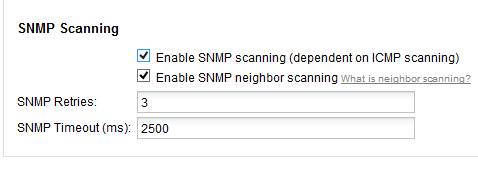
How does one get ipam to fill in the mac address vendor information? This seems to be a popular question at times. Here's how:
The vendor identification is based on neighbor scans, SNMP data, and DHCP Leases. Verify you have “neighbor scanning” enabled. Also be sure you have snmp enabled on the devices and being monitored by Orion.
Adding an update, if you are not monitoring these devices with Orion, OR using DHCP, you will have to enable snmp on each device you want this info from. So essentially if you are just scanning with IPAM and again not using DHCP you will have to manually enable SNMP on the devices.
Support KB's:
https://support.solarwinds.com/Success_Center/IP_Address_Manager_(IPAM)/IPAM_Administrator_Guide/030_Configuring_IPAM/030_Configuring_Subnet_Scan_Settings
https://support.solarwinds.com/Success_Center/IP_Address_Manager_(IPAM)/MAC_not_visible_to_some_used_IP_addresses
IPAM admin guide:
http://www.solarwinds.com/documentation/en/flarehelp/ipam/default.htm#orionipamphneighborscanning.htm