One of the most impactful concurrency improvements a DBA team can implement in SQL Server is enabling Read Committed Snapshot Isolation (RCSI). By leveraging row versioning to reduce read/write blocking, environments often experience immediate improvements in throughput, reduced lock waits, and fewer user complaints tied to blocking chains. SQL Sentry helps remove much of the guesswork by visualizing blocking, waits, and concurrency behavior in real time.
Confirmed that RCSI is not enabled:

Lets kick off a Blocking Chain!
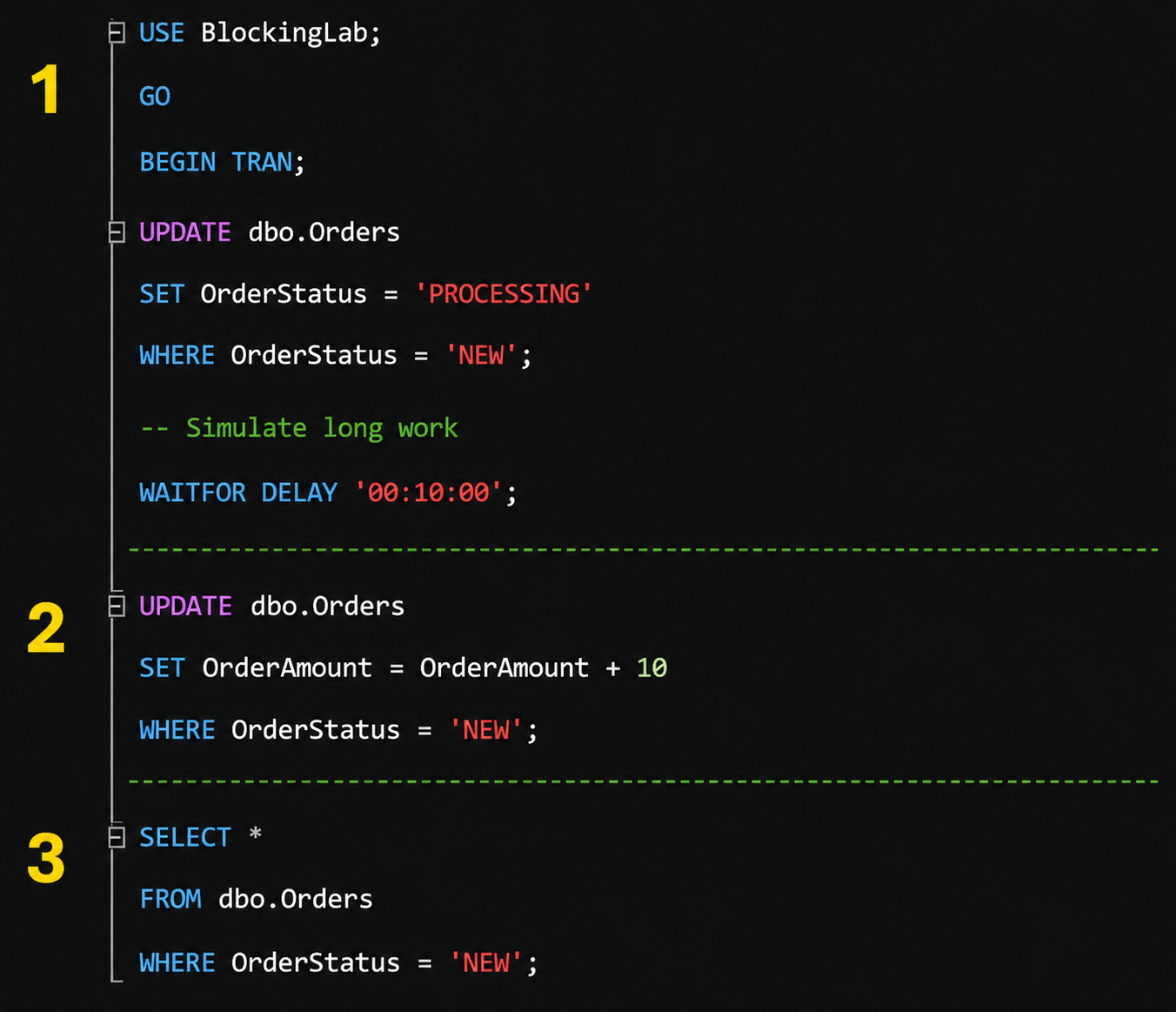
Session 1 is the head blocker. It starts a transaction, updates all NEW orders to PROCESSING, then intentionally waits for 10 minutes before rolling back. Because the transaction stays open, SQL Server continues holding the locks from the update, which prevents other sessions from safely changing or reading the affected rows depending on the isolation level.
Session 2 is the blocked writer. It tries to update the same rows where OrderStatus = 'NEW', but Session 1 already has incompatible locks on those rows. This session will appear to hang and may show lock waits such as LCK_M_X because it needs exclusive access to rows already locked by Session 1.
Session 3 is the blocked reader. It tries to select the same NEW orders while Session 1’s transaction is still open. Under traditional read committed isolation, this read can be blocked because SQL Server does not want to return uncommitted data; with RCSI enabled, this reader would typically avoid blocking by reading row versions instead.
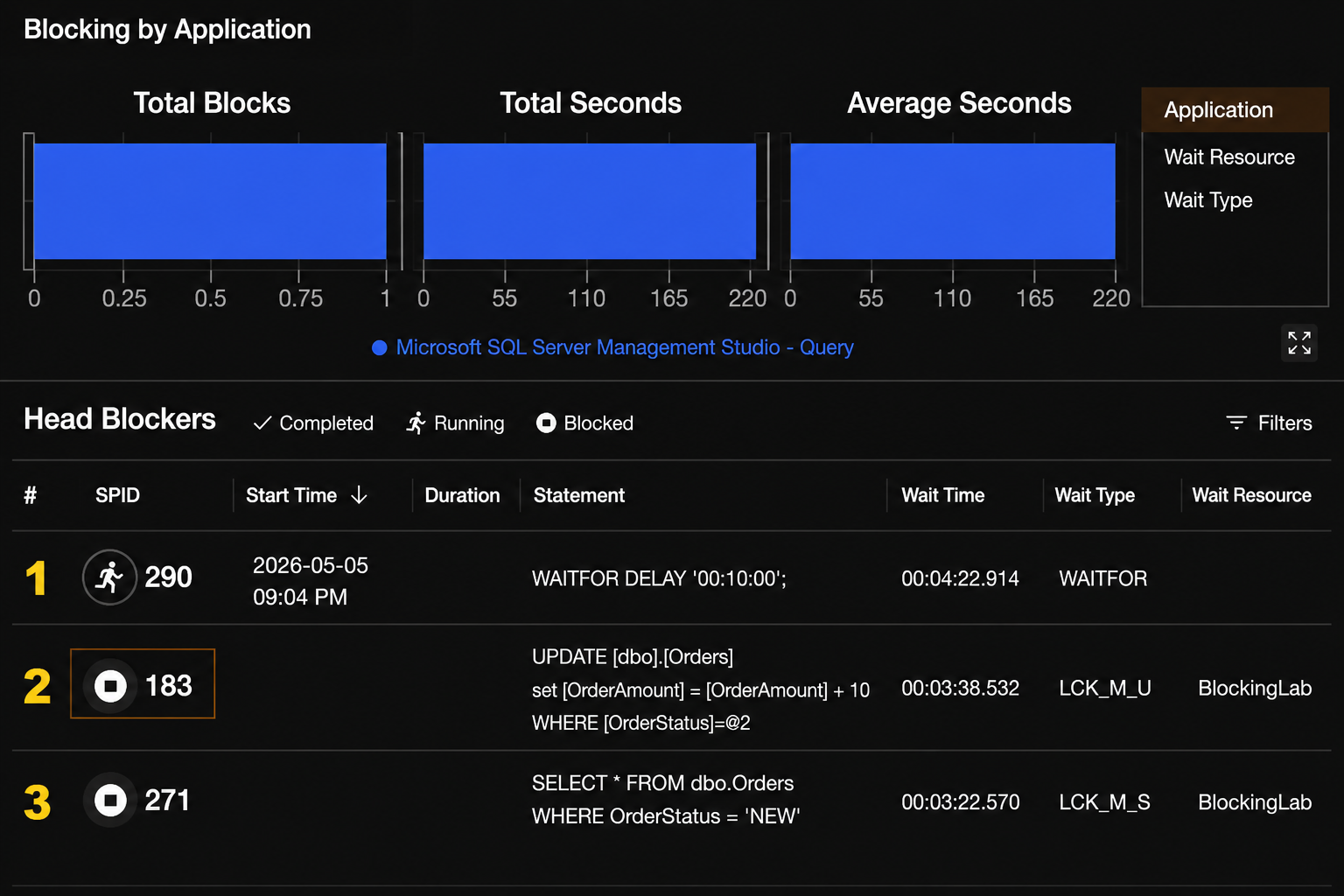
Without RCSI enabled, SQL Sentry immediately captured a blocking chain involving three active transactions and quickly identified SPID 290 as the Head Blocker. The long-running transaction holding locks caused downstream UPDATE and SELECT statements to become blocked, which SQL Sentry visualized in real time through the Blocking dashboard and wait analysis details. This makes it much easier for DBA teams to isolate the root blocking session, correlate wait types like LCK_M_U and LCK_M_S, and understand how concurrency pressure is impacting the workload.
Setting RCSI to enabled in SSMS:

Running those scripts in the same order as before to see what happens with a New Blocking Chain after RCSI is enabled.
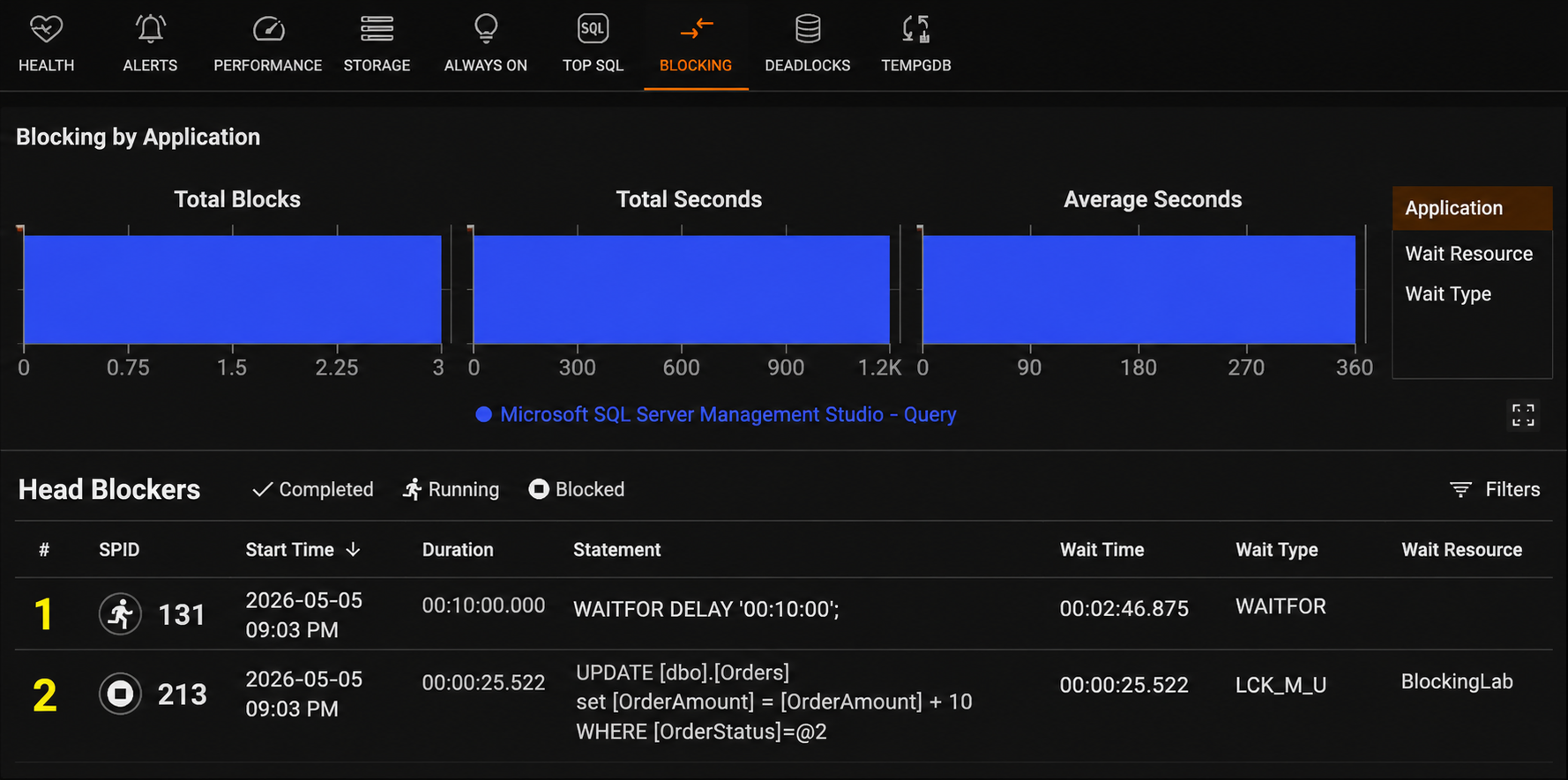
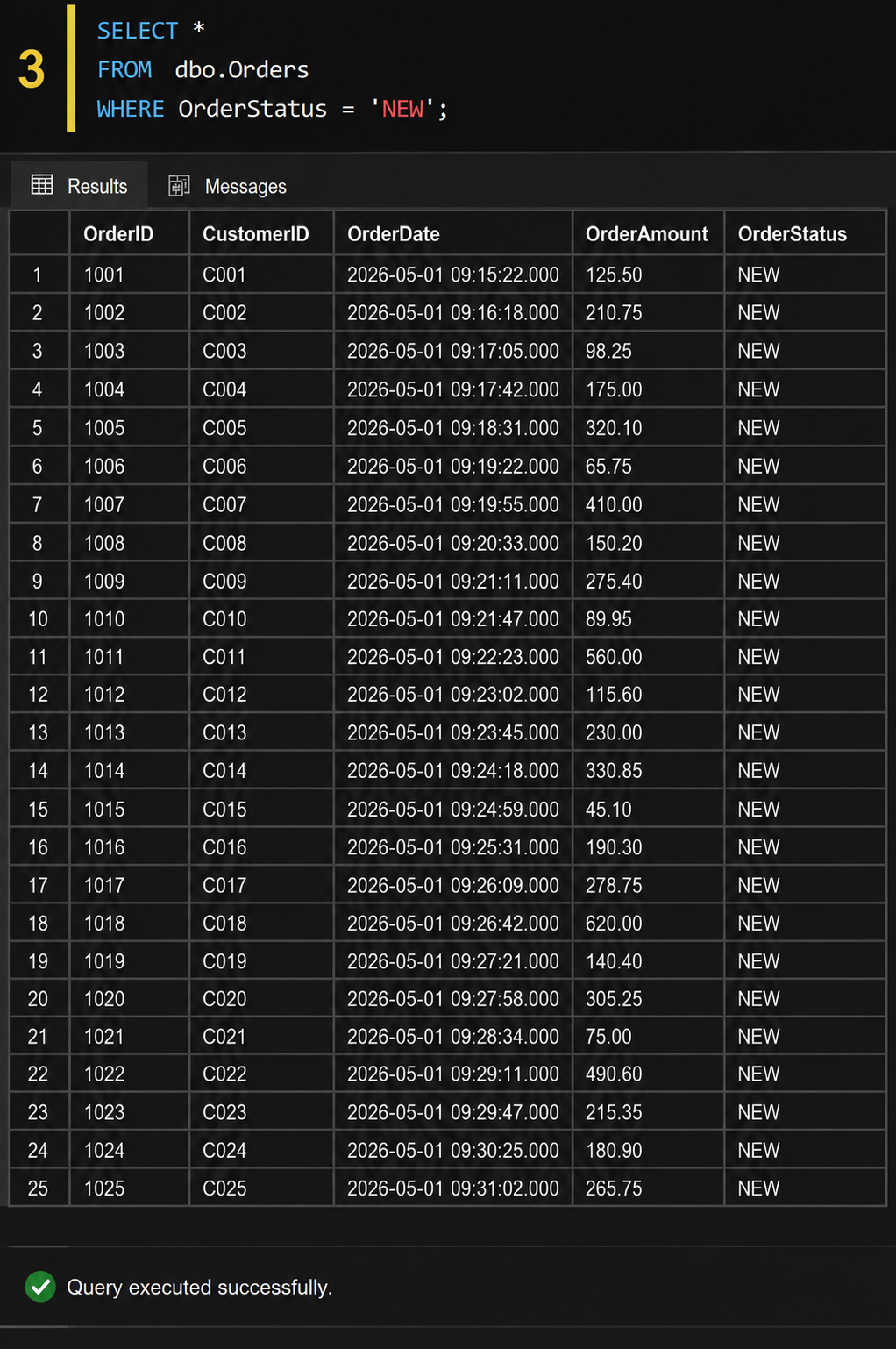
The results as shown below by enabling RCSI, SQL Sentry immediately identified SPID 131 as the Head Blocker while also capturing SPID 213 as the blocked writer transaction waiting behind the active update. Unlike the previous blocking chain, the Session 3 SELECT query no longer became blocked because RCSI redirected the read operation to row versions maintained through TempDB instead of waiting on locked rows within the primary database workload. This demonstrates how SQL Sentry can quickly visualize the reduction in read/write blocking, helping DBA teams validate concurrency improvements and observe how workload pressure shifts away from locking contention.
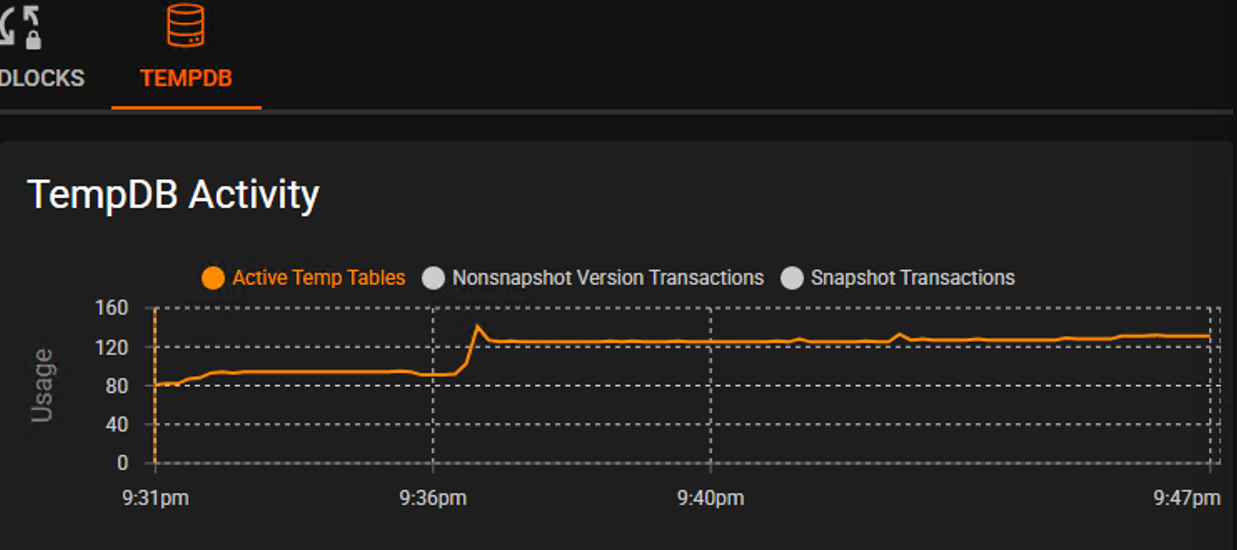
SQL Sentry Portal provides valuable visibility into TempDB behavior when Read Committed Snapshot Isolation (RCSI) is enabled, helping DBA teams correlate concurrency improvements with underlying version store activity. Because RCSI uses row versioning to reduce traditional read/write blocking, SQL Server stores previous row versions inside TempDB so readers can access committed snapshots without waiting on locks held by writers. As workload intensity or transaction duration increases, version store usage within TempDB can grow rapidly, making TempDB health and I/O performance increasingly important to monitor.
In this example below, the chart shows a noticeable spike in TempDB activity where the orange line sharply increases, reflecting elevated row versioning activity while RCSI is active. This visualization helps demonstrate how enabling RCSI shifts some concurrency pressure away from blocking and into TempDB usage, allowing DBA teams to proactively monitor version store growth, workload behavior, and overall concurrency trends through SQL Sentry Portal.
This lab environment was running on SQL Server 2017, where Read Committed Snapshot Isolation (RCSI) relies heavily on TempDB for row version storage. In later SQL Server releases, Microsoft introduced Accelerated Database Recovery (ADR), a feature designed to improve transaction recovery performance, reduce rollback times, and help availability environments recover more quickly during failovers or unexpected restarts. ADR enhances recovery operations by leveraging a Persistent Version Store (PVS), which changes how row versioning data is managed internally and helps reduce the operational impact of long-running transactions.
One important advantage of ADR is that versioning activity used by features such as RCSI is no longer dependent entirely on TempDB in newer implementations. Instead, the Persistent Version Store redistributes version storage into the user database itself, helping reduce TempDB pressure that can occur during heavy concurrency workloads. This becomes especially valuable in environments with significant read/write activity, where version store growth and TempDB contention may otherwise become bottlenecks. Combined with faster recovery and improved failover behavior for Availability Groups and secondary replicas, ADR represents a major enhancement to SQL Server concurrency and resiliency architecture in modern versions of the platform.
Disclaimer: Please note that any content, scripts, recommendations, or examples provided herein are intended for informational and educational purposes only for internal use. Some content may not be part of the official SolarWinds product software or documentation purchased from SolarWinds, and certain information or examples may reference third-party concepts or tools. Organizations should independently review, test, and assess whether any recommendations, scripts, or configuration changes are appropriate for their specific environments prior to implementation. Any use of third-party content or suggested configurations is at your own discretion and risk, and your organization assumes sole responsibility for any resulting changes or outcomes.