In Observability Self-Hosted 2026.1, we introduced Routing Insights — enriched routing tables and routing peer data that connected routes to their forwarding interfaces, next-hop peers, VRFs, and flap history.
Observability Self-Hosted 2026.2 delivers Routing Summary Dashboard. This post walks through what the Routing Summary Dashboard contains and how to use it to troubleshoot routing issues at scale.
From Per-Device Routing Data to Network-Wide Routing Health
The 2026.1 Routing Insights release answered routing questions at the node level — which prefixes a router carries, who its BGP peers are, when its routes last changed, which VRFs they belong to, and how often routes or peers have flapped.
That was a big step forward, but it still required you to know which device to look at before you could start investigating.
The remaining questions were all fleet-wide:
- Is the routing control plane stable right now across the whole network?
- Which protocol is generating churn — BGP, OSPF, or EIGRP?
- Which specific prefixes are unstable, regardless of which device they are seen on?
- Are neighbors the root cause, or are the routes themselves the problem?
- Which VRFs or tenant segments are currently affected?
The Routing Summary Dashboard is built to answer those questions before you open a single device view.
How the Routing Summary Dashboard Is Structured
The dashboard is laid out as a logical diagnostic flow. Each row answers a progressively narrower question, moving from global health to specific fault isolation.
A Flap Timeframe selector in the top-right controls all flap-related widgets. The default is last 7 days. Route and neighbor existence data is always current; only flap counts shift with the selected timeframe.
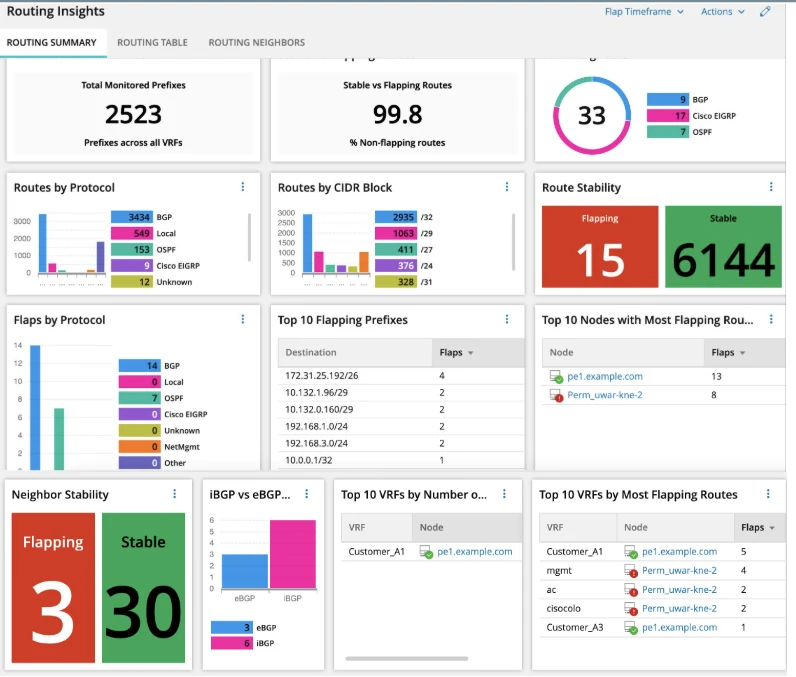
Row 1 — Global Routing Health
Widgets: Total Monitored Prefixes · Stable vs Flapping Routes · Total Neighbors
The top row answers a simple question: is routing healthy overall?
Total Monitored Prefixes counts every unique destination/CIDR combination across all monitored nodes. A sudden drop here is an early signal of device failure, a large-scale withdrawal event, or major configuration changes that removed routes. Because this is aggregated across the fleet, you don’t have to guess which router to check first — you see the effect across the network.
Stable vs Flapping Routes shows the percentage and count of routes with zero flaps in the selected timeframe versus those that have flapped at least once. Rising flap rates tell you the control plane is unstable even if traffic symptoms haven’t yet surfaced.
Total Neighbors reflects the BGP, OSPF, and EIGRP adjacency count across the fleet. Drops in neighbor count indicate lost sessions and are often the earliest signs of link failures, misconfiguration, or maintenance impacting peerings.
Viewed together, these three metrics tell you whether the routing control plane is healthy right now across the network, not just on a single router.
Row 2 — Routing Environment Composition
Widgets: Routes by Protocol · Routes by CIDR Block · Route Stability
The second row explains what kind of routing environment you are dealing with.
Routes by Protocol shows the mix of BGP, OSPF, EIGRP, and static routes across your network. This establishes context:
- BGP-heavy environments point to external peering and WAN edges.
- OSPF-heavy environments suggest internal IGP issues when flaps appear.
- Mixed environments may show issues isolated to one protocol.
Routes by CIDR Block groups prefixes into the top five CIDR categories (for example, /24, /30, /31, /32), with the remainder shown as “Other.” This matters because instability in different CIDR ranges often means different things:
- /31s and /30s typically represent WAN point-to-point links.
- /32s are often loopbacks or host routes.
- /24s usually indicate access networks or aggregation blocks.
If flap activity aligns heavily with /31s and /30s, you are likely dealing with WAN link instability; if /24s are unstable, you may be looking at access-prefix issues.
Route Stability gives you the raw count of flapping versus stable routes in the current timeframe. Combined with the protocol and CIDR breakdowns, this tells you how widespread the instability is and whether it is focused on a specific protocol, link type, or address range.
Row 3 — Instability Isolation
Widgets: Flaps by Protocol · Top 10 Flapping Prefixes · Top 10 Nodes with Most Flapping Routes
By the third row, you know that something is unstable and have a rough idea of where to look (by protocol and CIDR). This row isolates the problem.
Flaps by Protocol identifies which routing protocol is generating the most flap events in the selected timeframe. If BGP dominates this chart, focus on peerings and policies; if OSPF dominates, you likely have IGP adjacency churn.
Top 10 Flapping Prefixes shows the exact destination/CIDR combinations with the highest flap counts. This list focuses solely on instability, not the volume of routes, as it only includes entries with at least one flap.
Top 10 Nodes with Most Flapping Routes maps that instability back to hardware:
- Which routers are associated with the most flapping routes?
- Is a small set of devices responsible for the majority of churn?
Together, these three widgets answer the following:
- Which protocol is affected?
- Which specific prefixes are flapping?
- Which devices are at the centre of the instability?
This is where you move from, “Is something wrong?” to “Here are the exact prefixes and nodes to investigate.”
Row 4 — Neighbor Health
Widgets: Neighbour Stability · iBGP vs eBGP Neighbors
Route flaps are frequently symptoms of adjacency problems rather than route-level configuration mistakes. Row 4 brings the control-plane neighbor view into the same story.
Neighbor Stability shows the fleet-wide count of flapping versus stable BGP, OSPF, and EIGRP peers over the selected timeframe. If you see spikes in neighbor flaps alongside route flaps, it is a strong sign that peers are going up and down repeatedly, underlying link or transport issues are present, or timers and policies are misaligned.
iBGP vs eBGP Neighbors adds directionality:
- iBGP instability often points to issues with route reflectors, internal policy changes, or configuration drift.
- eBGP instability typically traces back to upstream providers, peering partners, or edge circuits.
When you correlate Row 3 (flapping prefixes and nodes) with Row 4 (flapping neighbors) and see them align, neighbor sessions are very likely the root cause of your routing problems.
Row 4 — VRF Impact
Widgets: Top 10 VRFs by Number of Neighbors · Top 10 VRFs by Most Flapping Routes
VRFs represent customer segments, internal service domains, or tenant boundaries. The final row answers the most important question for stakeholders: who is impacted?
Top 10 VRFs by Number of Neighbors identifies the most interconnected routing domains — those with the most neighbors. These are your high-dependency VRFs: a problem here is more likely to cause widespread impact.
Top 10 VRFs by Most Flapping Routes shows which of those VRFs are actively degraded. Only VRFs with at least one flapping route appear in this list, keeping the focus on actual issues instead of theoretical risk.
Together, these widgets tell you whether instability is confined to a single VRF (a bounded blast radius) or spread across multiple tenants or service domains. This is what lets you move from technical observation (“BGP is flapping”) to business context (“only this VRF for this customer is currently degraded”).
The Six Questions the Dashboard Answers — In Order
When you follow the dashboard from top to bottom, it answers the full routing root-cause chain:
- Is routing unstable right now? → Row 1 — Stable vs Flapping Routes
- Which protocol is affected? → Row 2 — Routes by Protocol and Row 3 — Flaps by Protocol
- Which specific prefixes are flapping? → Row 3 — Top 10 Flapping Prefixes
- Which devices are at the center of the instability? → Row 3 — Top 10 Nodes with Most Flapping Routes
- Are neighbor sessions the likely root cause? → Row 4 — Neighbor Stability and iBGP vs eBGP Neighbors
- Which VRFare impacted? → Row 4 — Top 10 VRFs by Most Flapping Routes