Hi Everyone,
I’ve built a Custom Table report using a SWQL datasource to show:
- Hyper-V Host details
- Guest VM details underneath each host
Unfortunately the output formatting is not what I expected. Host values are repeating for every VM row, instead of appearing once as a header, so I suspect this may be grouping related — or maybe there’s a better approach that I’m missing.
If anyone has done something similar, I’d really appreciate some guidance.
Here is the SWQL I’m using:
SELECT vm.Host.DisplayName AS [Hyper-V Host],
vm.Host.Model AS [Host Model],
vm.Host.Vendor as [Host Vendor],
vm.Host.CpuCoreCount as [Host Cores],
vm.Host.VMwareProductName as [Host OS],
ROUND(vm.Host.MemorySize / 1024.0 / 1024.0 / 1024.0, 1) AS [Host Mem(GB)] ,
vm.Name AS [Guest Name],
vm.PowerState AS [Guest Power State],
vm.ProcessorCount AS [vCPU],
ROUND(vm.MemoryConfigured / 1024.0 / 1024.0 / 1024.0, 1) as [Guset Mem(GB)],
vm.GuestName AS [Guest_OS],
vm.GuestState AS [Guest State]
FROM Orion.VIM.VirtualMachines vm
ORDER BY vm.Host.DisplayName, vm.Name
Expected Output format

Grouping while adding column unable to group it ot name it

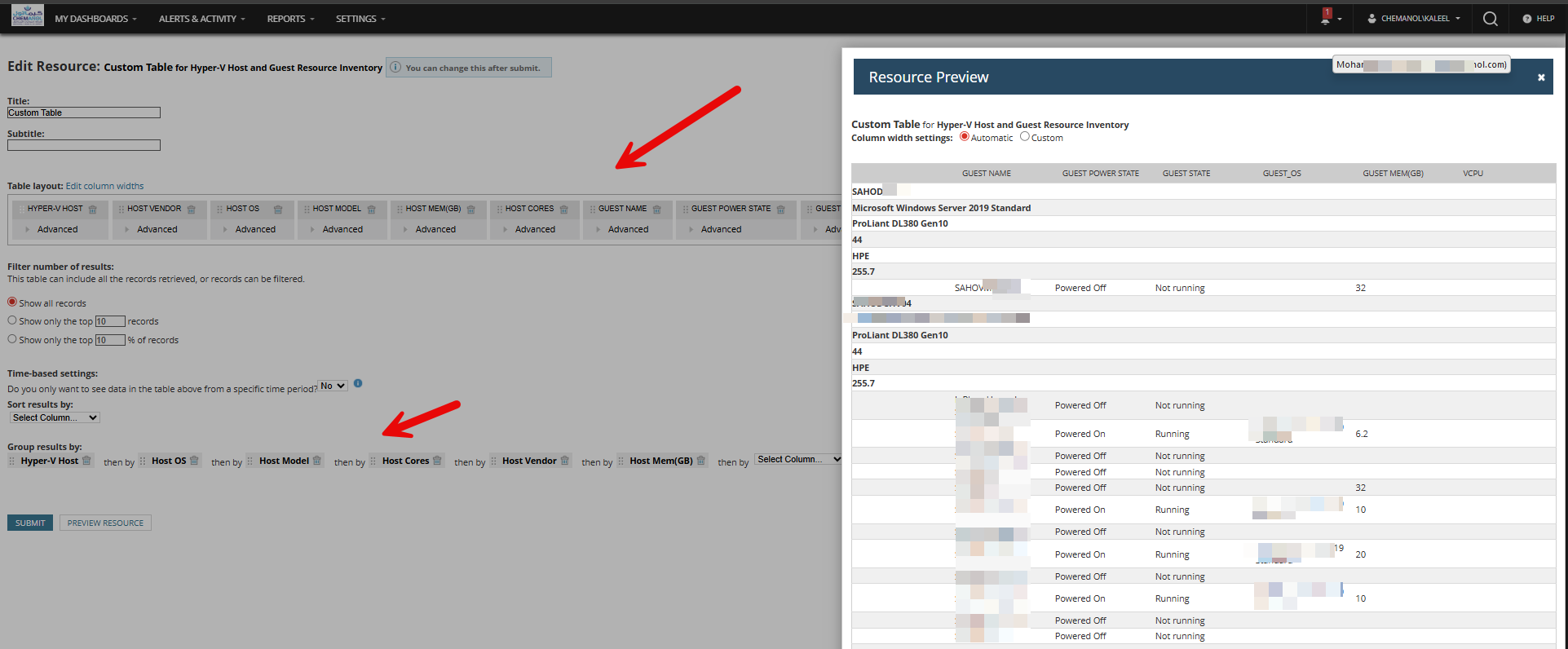
What I am trying to achieve
- Display the host once (like a header)
- Show all VMs under that host
- I would also like to retrieve the VM CPU cores assigned, but haven’t found the right field yet.
Any suggestions on grouping, formatting, or better query structure would be greatly appreciated.
Thanks in advance!