In the world of infrastructure and network observability, auto-discovered topology maps have become a staple. They’re fast, convenient, and often good enough to get started, but they can’t capture every custom scenario or user preference. Sometimes, it may be better to start with a blank canvas and paint the exact picture you want to see.
Infrastructure and network teams often operate in environments that defy standardization. Auto-discovery can miss critical context such as business logic, compliance zones, or ephemeral components.
We’re excited to share a sneak peek into a new feature we’re working on: Custom Maps, a fresh take on topology visualization designed for users who want full control over how their infrastructure is represented.
The Vision—Your Network, Your Way
With this new Custom Maps feature, you become the architect of your observability map. Instead of tweaking an auto-discovered diagram, you can build the exact network picture you have in mind, filtering down to only the most important devices and links. A blank canvas lets you design the precise picture you need. We’re excited to give network and infrastructure teams this flexibility. Stay tuned for more exciting news as we work toward a more robust and flexible experience and get ready to draw your network on your terms.
From Auto-Discovery to Intentional Design
Most observability platforms offer auto-discovered topology views that infer relationships between services, nodes, and dependencies. While these are useful, they often fall short in environments where:
- The topology is highly customized or nonstandard
- Relationships are known but not easily inferred from metrics or logs
- Teams want to visualize logical groupings, business domains, or hybrid architectures
Custom Maps flips the script: instead of starting with what the system thinks your topology looks like, you start with a blank canvas and build the map that reflects your reality.
Getting Started (Tech Preview)
Custom Maps is now available in Tech Preview. We’re looking for design partners and early adopters who want to help shape the future of topology visualization.
To access it, you’ll find the new “Custom Maps” tab under the Network/Topology menu.
Feedback welcome: this is an evolving feature. We encourage you to experiment and let us know via the “Give Feedback” button in SolarWinds® Observability what works or what’s missing. Your input will guide the development.
Key Features of the Topology Canvas
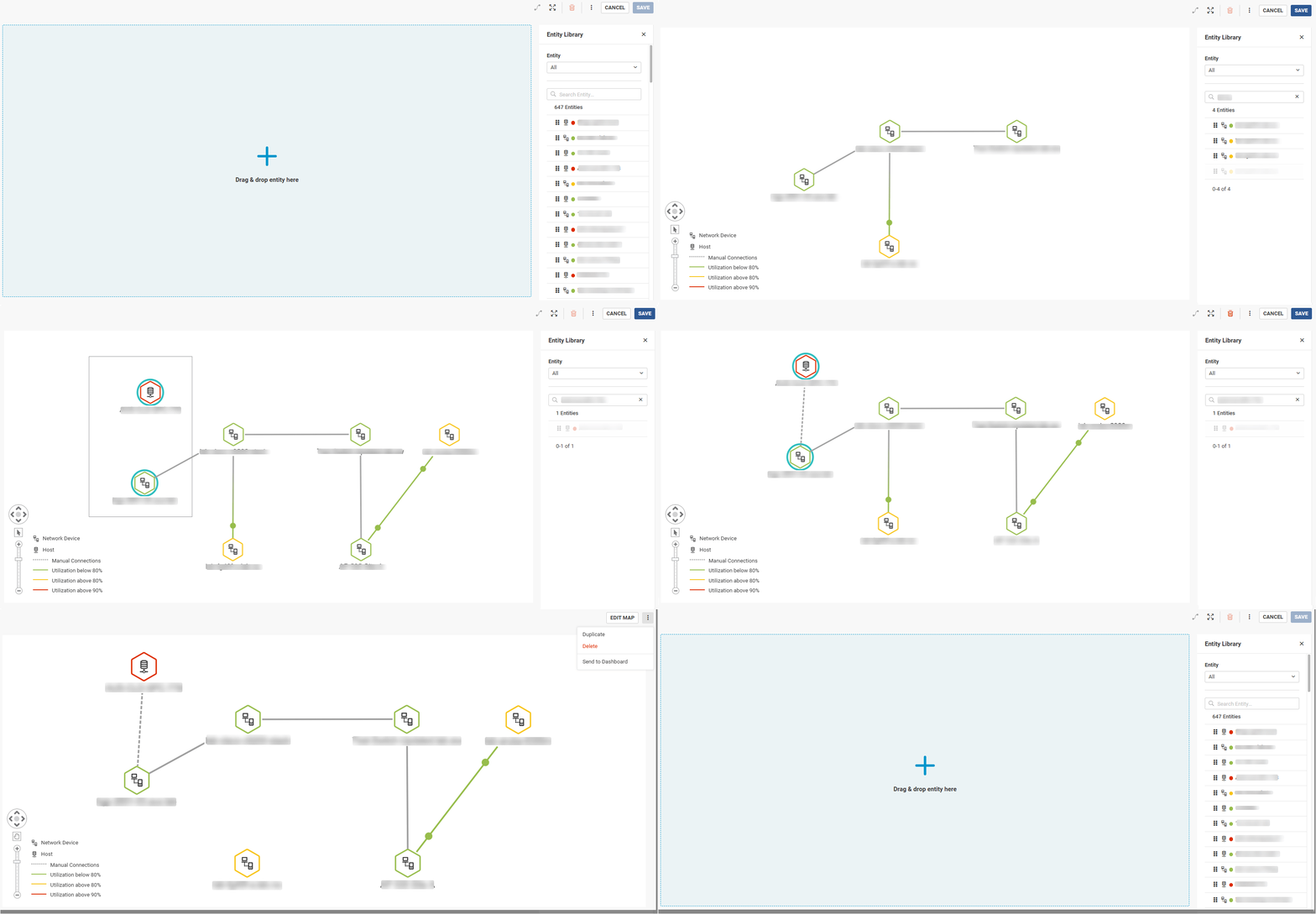
- Blank Canvas Editor: Launch a large empty workspace where you build the map from scratch
- Entity Library: Browse or search a palette of predefined infrastructure components (servers, routers, switches, firewalls, cloud regions, etc.) to drag onto the canvas; you can filter entities by type, vendor, or environment
- Drag-and-Drop Workflow: Drag an item from the library and drop it onto the map; this “what you see is what you get” approach makes it easy to position elements visually
- Connection Tools: Use a connector tool to draw custom links between any two nodes (e.g., Ethernet cable, logical overlay, and data flow); select two devices, and click the “Connect” button to draw a link between them
- Saving and Sharing: Save your custom map to share it with colleagues or embed it in dashboards
How It Works (Step by Step)
- Open the Custom Map Editor: In the Network > Topology, select “Custom Maps” and click “Create” to launch the blank workspace
- Select Entities: On the side panel, browse the entity library, and use filters or the search function to find components relevant to your scenario
- Add Elements: Drag a chosen entity (e.g., a switch or virtual machine) onto the canvas; it appears as an icon/node with default settings
- Connect Nodes: Entities with a Layer 2/Layer 3 relationship will be automatically connected with a solid colored line; to represent a link, select two nodes and click the “Connect” tool to draw a link between them
- Finalize and Save: Once your map is built, give it a name and save it; you can return later to edit it or send it to a dashboard
- Inspect Your Map: After your map is saved, you can view details of your nodes and the auto-discovered connections
Looking Ahead
This initial release focuses only on core editing capabilities for network devices and on-premises hosts. In future updates, we aim to add:
- Expanded Libraries: More device types, cloud resources, services, and applications
- Increased Customization: The ability to import custom backgrounds
- Better Tooling: More tools to align and organize your nodes within the canvas faster
- Integration With Other Areas of the Platform: The ability to overlay configuration management data, alerts, and other context to get to the root cause of your problem faster
- Automation Options: While our focus remains on manual design, we may introduce hybrid features, such as importing a discovered subnet to get you started