In part 2, I explained how to create the form necessary for the Quad NOC browser for use with SolarWinds products like SAM and NPM. In this part I'll give you all the code you need to get this up and running. Check out parts 1 and 2 if you have not done so already.
This Browser is not Feature Rich.
Exactly. And there's a reason for that: I don't know what features you want. The point of this exercise is for you to continue to improve upon this bare bones browser to suit your needs. Once you see the code (below) and play around with it, you may be inspired to add some features of your own.
Feature Ideas
There are countless things you can have your new browser do. You are just limited by your time and imagination. Here are just a few ideas to get you started:
- Add a Home and/or Refresh button
- Have more than four windows
- Add dynamic bookmarks
- Add a sidebar that shows reports/alerts
- Add search engines that you use
- Add the ability to email a page
- Make the browser always on top
- Add a note pad
Compile the Code
Below is the code you will need to add to your Quad NOC project in Visual Basic. In your project, go to the Code view and delete everything. Next, copy and paste the code below. When done, you should have something that looks like this:
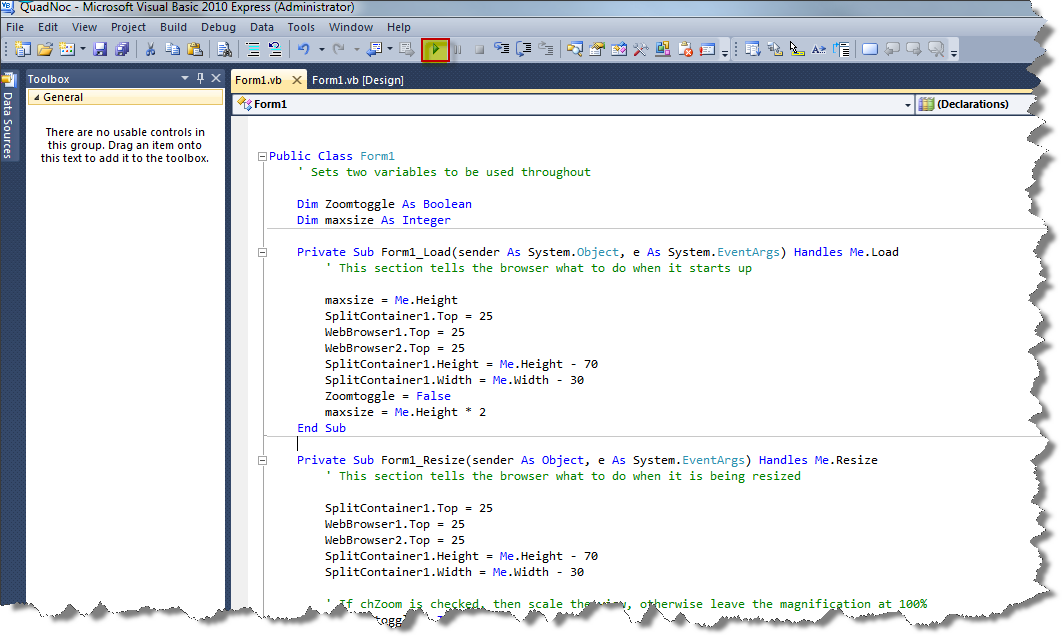
If all is well, hit the Play button, highlighted above. The browser should appear before you working as planned. If everything works, compile your code into an executable.
Compiling your code into an executable:
- From the Build menu, select Build...
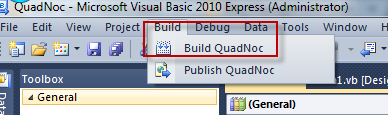
- If successful, your executable should reside in a path similar to this: C:\VS2010\QuodNOC\QuadNOC\bin\Release
Copy and Paste Me - Read the comments in green before compiling
Public Class Form1
'Sets two variables to be used throughout
Dim Zoomtoggle As Boolean
Dim maxsize As Integer
Private Sub Form1_Load(sender As System.Object, e As System.EventArgs) Handles Me.Load
' This section tells the browser what to do when it starts up
maxsize = Me.Height 'The MAXSIZE variable is equal to the height of the form
SplitContainer1.Top = 25 'The top of this control starts 25 twips from the top of the form
WebBrowser1.Top = 25 'The top of this control starts 25 twips from the top of the form
WebBrowser2.Top = 25 'The top of this control starts 25 twips from the top of the form
SplitContainer1.Height = Me.Height - 70 'The height of this control is = to the height of the form minus 70 twips
SplitContainer1.Width = Me.Width - 30 'The width of this control is = to the width of the form minus 30 twips
Zoomtoggle = False 'This boolean variable is set to false
maxsize = Me.Height * 2 'This integer variable is set to twice the height of the main form
End Sub
Private Sub Form1_Resize(sender As Object, e As System.EventArgs) Handles Me.Resize
' This section tells the browser what to do when it is being resized
SplitContainer1.Top = 25
WebBrowser1.Top = 25
WebBrowser2.Top = 25
SplitContainer1.Height = Me.Height - 70
SplitContainer1.Width = Me.Width - 30
' If chZoom is checked, then scale the view, otherwise leave the magnification at 100%
If Zoomtoggle = True Then
Dim Scale As Integer
Scale = Int(Me.Height * 100 / maxsize) 'Set the Scale variable equal to the height of the form X 100 and divided by the variable Maxsize, truncating decimal places
ZoomPage(Me.WebBrowser1, Scale) 'Use the Zoompage function to scale this browser
ZoomPage(Me.WebBrowser2, Scale) 'Use the Zoompage function to scale this browser
ZoomPage(Me.WebBrowser3, Scale) 'Use the Zoompage function to scale this browser
ZoomPage(Me.WebBrowser4, Scale) 'Use the Zoompage function to scale this browser
Else
ZoomPage(Me.WebBrowser1, 100) 'Use the Zoompage function to keep this browser at 100% zoom
ZoomPage(Me.WebBrowser2, 100) 'Use the Zoompage function to keep this browser at 100% zoom
ZoomPage(Me.WebBrowser3, 100) 'Use the Zoompage function to keep this browser at 100% zoom
ZoomPage(Me.WebBrowser4, 100) 'Use the Zoompage function to keep this browser at 100% zoom
End If
Exit Sub
End Sub
Private Class OleCmd
'This section references the browser magnification control
Public Enum OLECMDEXECOPT As Integer
OLECMDEXECOPT_DONTPROMPTUSER = 2
End Enum
Public Enum OLECMDID As Integer
OLECMDID_OPTICAL_ZOOM = 63
End Enum
End Class
Private Sub ZoomPage(ByVal wb As System.Windows.Forms.WebBrowser, ByVal Factor As Integer)
Try
Dim [ActiveXInstance] As Object = wb.ActiveXInstance()
[ActiveXInstance].ExecWB _
( _
OleCmd.OLECMDID.OLECMDID_OPTICAL_ZOOM, _
OleCmd.OLECMDEXECOPT.OLECMDEXECOPT_DONTPROMPTUSER, _
DirectCast(Factor, Object), _
IntPtr.Zero _
)
Catch ex As Exception
End Try
End Sub
Private Sub cmdGo_Click(sender As System.Object, e As System.EventArgs) Handles cmdGo.Click
'When the Go button is clicked, decide which Quadrant Radio Button is checked and then navigate to the address typed in the text box
If Q1.Checked Then WebBrowser1.Navigate(TextBox1.Text)
If Q2.Checked Then WebBrowser2.Navigate(TextBox1.Text)
If Q3.Checked Then WebBrowser3.Navigate(TextBox1.Text)
If Q4.Checked Then WebBrowser4.Navigate(TextBox1.Text)
End Sub
Private Sub cmdBack_Click(sender As System.Object, e As System.EventArgs) Handles cmdBack.Click
'When the Back button is clicked, decide which Quadrant Radio Button is checked and then navigate back to the previous page.
If Q1.Checked Then WebBrowser1.GoBack()
If Q2.Checked Then WebBrowser2.GoBack()
If Q3.Checked Then WebBrowser3.GoBack()
If Q4.Checked Then WebBrowser4.GoBack()
End Sub
Private Sub cmdForward_Click(sender As System.Object, e As System.EventArgs) Handles cmdForward.Click
'When the Forward button is clicked, decide which Quadrant Radio Button is checked and then navigate forward.
If Q1.Checked Then WebBrowser1.GoForward()
If Q2.Checked Then WebBrowser2.GoForward()
If Q3.Checked Then WebBrowser3.GoForward()
If Q4.Checked Then WebBrowser4.GoForward()
End Sub
Private Sub chZoom_CheckedChanged(sender As System.Object, e As System.EventArgs) Handles chZoom.CheckedChanged
On Error Resume Next
' If chZoom is checked, then scale the view, otherwise leave the magnification at 100%
Zoomtoggle = Not Zoomtoggle
If Zoomtoggle = True Then
Dim Scale As Integer
Scale = Int(Me.Height * 100 / maxsize)
ZoomPage(Me.WebBrowser1, Scale)
ZoomPage(Me.WebBrowser2, Scale)
ZoomPage(Me.WebBrowser3, Scale)
ZoomPage(Me.WebBrowser4, Scale)
Else
ZoomPage(Me.WebBrowser1, 100)
ZoomPage(Me.WebBrowser2, 100)
ZoomPage(Me.WebBrowser3, 100)
ZoomPage(Me.WebBrowser4, 100)
End If
End Sub
Private Sub chRefresh_CheckedChanged(sender As System.Object, e As System.EventArgs) Handles chRefresh.CheckedChanged
' If chRefresh is checked, start the 60 second timer
If chRefresh.Checked = True Then Timer1.Enabled = True
If chRefresh.Checked = False Then Timer1.Enabled = False
End Sub
Private Sub Timer1_Tick(sender As System.Object, e As System.EventArgs) Handles Timer1.Tick
'When enabled, the timer will refresh all four browsers every 60 seconds
WebBrowser1.Refresh()
WebBrowser2.Refresh()
WebBrowser3.Refresh()
WebBrowser4.Refresh()
End Sub
Private Sub TextBox1_KeyDown(sender As Object, e As System.Windows.Forms.KeyEventArgs) Handles TextBox1.KeyDown
On Error Resume Next
'Determine when the user presses Return (Enter). When Return is pressed, then decide which browser navigates to the address in the text box by checking which radio button is selected
If e.KeyCode = Keys.Return Then
If Q1.Checked Then WebBrowser1.Navigate(TextBox1.Text)
If Q2.Checked Then WebBrowser2.Navigate(TextBox1.Text)
If Q3.Checked Then WebBrowser3.Navigate(TextBox1.Text)
If Q4.Checked Then WebBrowser4.Navigate(TextBox1.Text)
End If
End Sub
Private Sub LinkLabel1_LinkClicked(sender As System.Object, e As System.Windows.Forms.LinkLabelLinkClickedEventArgs) Handles LinkLabel1.LinkClicked
'When this link is clicked, decide which of the four browsers will navigate to the hard coded address
If Q1.Checked Then WebBrowser1.Navigate("Google.com")
If Q2.Checked Then WebBrowser2.Navigate("Google.com")
If Q3.Checked Then WebBrowser3.Navigate("Google.com")
If Q4.Checked Then WebBrowser4.Navigate("Google.com")
End Sub
Private Sub LinkLabel2_LinkClicked(sender As System.Object, e As System.Windows.Forms.LinkLabelLinkClickedEventArgs) Handles LinkLabel2.LinkClicked
'When this link is clicked, decide which of the four browsers will navigate to the hard coded address
If Q1.Checked Then WebBrowser1.Navigate("Google.com")
If Q2.Checked Then WebBrowser2.Navigate("Google.com")
If Q3.Checked Then WebBrowser3.Navigate("Google.com")
If Q4.Checked Then WebBrowser4.Navigate("Google.com")
End Sub
End Class