Heya,
I need to test my devices and see which are ssh enable and which are not.
Is there any way to create a report just to check if the ssh is responding on the Switch/router/access-points?!
Let's make it easy and do the simplest thing first.
I'm assuming you have NCM 7.4 and you've integrated it with NPM 11.5.2.
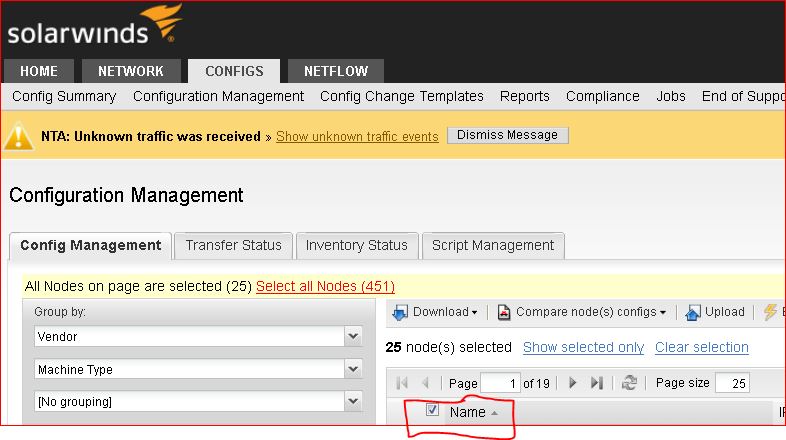
Open a web browser to you NPM page and log in.
Click on the Configs tab.
Select the Configuration Management sub heading.
Group by Vendor, then Machine Type (if you want to limit this discovery to specific machine types). I'll just pick the Cisco vendor icon grouping in the window below.
In the right window, click the empty Radio box to select all devices.
Click execute script
Type in the command you'd use to show the SSH status on a single device (e.g.: show run | in ssh)
Now click Execute in the lower right.
NCM will run that script against all selected devices, and will present an output of what it finds on a per-device basis.
The previous version of NCM allowed this to be done from the Application instead of only via the Web UI, and the app showed the output for all devices in one easy view. The Web UI requires you to open each device's script results output separately. Here's how to view the output:
From NPM, go to Configs tab, then Configuration Management, then to Transfer Status.
In the Status Details column you can click on the "Show Script Results" output for each device.
Does this show what you need? If not, I can step you through the Report creation, but it's longer and more detailed.
The simplest thing would be to run a report in NCM looking for your NCM settings. You can also create a Policy that not only searches for those SSH settings, but remediates them if they're missing.
All you need to know for remediation is the syntax for each of your device's styles and OS's. You may find it helpful to build a report for each different type and OS of device.
At a very minimum you could select the devices and execute a command script on them, something like "show run | in ssh".
But NCM has some good Cisco and Security Policies already built, and you may already have reports that show which devices have SSH enabled correctly and which don't.
Don't forget that SSH has some better solutions for improved security deployment. For example:
Remember that SSH needs a crypto key generated on your devices before they can terminate an SSH session. Review the documentation for your equipment that specifies how to generate that key--if it hasn't already been generated.
Pick the right size key for your equipment, understanding the larger keys (e.g.: 2048) are thought to be more secure. But older versions of code and smaller CPU's may not support larger key sizes. It's handy to have the same key size for all systems, but it's best not to increase your risk by shrinking the key size of your big equipment down to the meet the capabilities of your smallest gear.
Some places to start, if you're using Cisco:
https://learningnetwork.cisco.com/thread/43634
https://learningnetwork.cisco.com/thread/14376
Good luck!
Thanks but I need a walk trough this.
I`m trying to create a new report but cannot find ssh for the nodes.
Wow, Thanks very much for the detailed reply.
Yes, that would solve my problem. I `ll try here and let you know.