Hi everyone,
I am new to FTP Voyager, and I am using FTP Scheduler feature to sync the data on remtoe ftps site. It
Client OS: Windows 7 /10 Professional
Server: Windows 2012 R2 with FileZilla Server installed.
Issue details: I want to sync the data on ftps server to my local network share driver. It happens that when the transfor over the internet, If I set up the ftps in the intranet, there is no problem.
But I am SURE that all the ports that FileZilla using is opened on the firewall. I can use FTP Voyager client to download the files manually
Based on the documentation on the offical website, I disable the UAC and use UNC instead of mapped letter. When I sync the data, a few minutes later, I found the following errors:
Error logs from FTP Client
|
|---|
[03] Mon 04Dec17 13:04:18 - Private IP address returned by the server in response to PASV command. [03] Mon 04Dec17 13:04:18 - Converting private IP address XXXXXX to public IP address XXXX. [03] Mon 04Dec17 13:04:18 - Opening passive mode data connection to XXXX, port 51145. [03] Mon 04Dec17 13:04:19 - Negotiating SSL connection with server... [05] Mon 04Dec17 13:04:19 - MLSD [03] Mon 04Dec17 13:04:19 - SSL connection established. All transactions are now secure. [03] Mon 04Dec17 13:04:19 - Encryption cipher: 256 bit AES; Version: TLSv1/SSLv3. [06] Mon 04Dec17 13:04:19 - 150 Opening data channel for directory listing of "XXXXX" [06] Mon 04Dec17 13:04:19 - 226 Successfully transferred "XXXXX" [03] Mon 04Dec17 13:04:19 - Transferred 7,413 bytes. 114.91 KB/sec. [06] Mon 04Dec17 13:06:19 - 421 Connection timed out. |
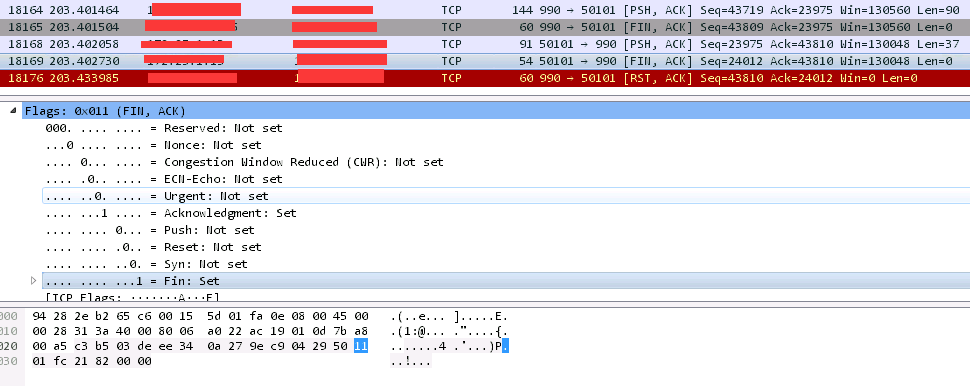
I also use Wireshark to troubleshot the problem and found that there is no responsing from client after FTP server send the ACK packet:
Any ideas on the issue?
Regards,
Bruce
