Would like to see NCM have a more feature rich method of selecting nodes (i.e. dynamic selection) in a compliance policy. Something more of a query language or filter rules that could be displayed in text format, audited, copied & pasted from one policy to another, etc.
Today, if I only wanted to select my Nexus data center devices, I could choose "Select nodes" and group by "OS Image". Then select (check) n5000-uk9 and n7000-s2-dk9 images. This correctly selects the devices I'm wanting to add to the policy, but each time I try to display the selection again when editing the policy, those images aren't checked anymore. In other words, I have no way to visible see the search criteria that was previously selected when creating the policy.
Ideally, it would be something more along the lines of a query/filter command like: OS Image matches regex "n[5|7]000.*" which would accept regular expressions. That one simple line would select any Nexus 5000 or 7000 OS image, regardless of supervisor module or feature set.
Another example would be:
( Node Caption matches regex ".{5}ispr\d+" // Internet edge routers per corporate naming convention (ex. TXHOUISPR1 and TXHOUISPR2 - Router 1 & 2, ISP, Houston Texas)
OR Node Caption matches regex ".{5}corr\d+" ) // Campus core routers per corporate naming convention (ex. TXHOUCORR1 - Router 1, Campus Core, Houston Texas)
AND OS Version matches regex "15.*" // Running IOS Version 15
or
All > Node Caption matches regex "{.5}ispr\d+" .or. Node Caption matches regex "{.5}corr\d+" > OS Version matches regex "15.*"
Today, I can only select Node Caption is "*corr*" using wildcards which selects more devices than intended, for example WVCORR1 - Router 1 at Corely, West Virginia, which isn't a core network device. Using regular expressions in the search criteria would eliminate this issue.
Below is an example of filter rules within OpsGenie that significantly expands on the condition operators as well.
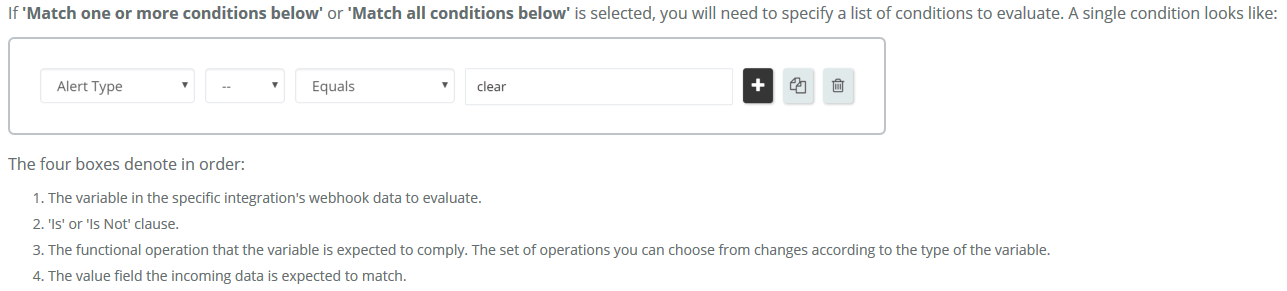
Condition Operations
Equals
It is applicable for String, Boolean and Number variable types. It returns true if the specified variable's value and the expected value are the same.
Contains
It is applicable for String, List and Map types. It returns true if the specified variable's value contains the expected string. For maps, expected value can be contained by key or by value fields.
Is Empty
It is applicable for String, List and Map types. It returns true if the specified variable is empty. For string it checks character count, for list and map, it checks size.
Matches
It is applicable for String and Number types. It returns true if the specified variable's value matches given regular expression.
Contains Key
It is applicable for Map type. It returns true if the specified variable contains the expected value in keys.
Contains Value
It is applicable for Map type. It returns true if the specified variable contains the expected value in values.
Starts With
It is applicable for String type. It returns true if the specified variable starts with the expected value.
Ends With
It is applicable for String type. It returns true if the specified variable ends with the expected value.
Greater Than
It is applicable for Number type. It returns true if the specified variable is greater than the expected value.
Less Than
It is applicable for Number type. It returns true if the specified variable is less than the expected value.
Equals Ignore Whitespace
It is applicable for String type. It returns true if the specified variable is equal to the expected value after removing all whitespace(space, tab, new line, carriage return characters) from both the specified and the expected value.
