I have a number of user devices that are incompatible with various standard switchport configurations (e.g.: Zebra bar code label printers are incompatible with Cisco voice vlan settings), and I use UDT to track down these devices' switches and switchports when troubleshooting their issues. Knowing that the problem lines of my company's standard config are present, or not present, speeds troubleshooting the devices.
Finding the switch and switchport are a great first step from UDT, but the job isn't done yet. It would be so much more efficient if UDT also displayed the section of the switch's running-config for that port, right in the UDT search results screen.
Without being able to immediately see the running-config lines for that port right in UDT, I have more steps to follow:
1. Discover the switch's management address
2. Open Putty
3. SSH to the switch
4. Log in
5. issue the "show run int gix/x/x" command
6. Analyze the output for problem / incompatible lines that may or may not be present
7. Add or remove the appropriate lines
Imagine the results of a UDT search not only showing the switch and switchport where a given MAC address is located, but also including the running-config section for that port, taken right from NCM!
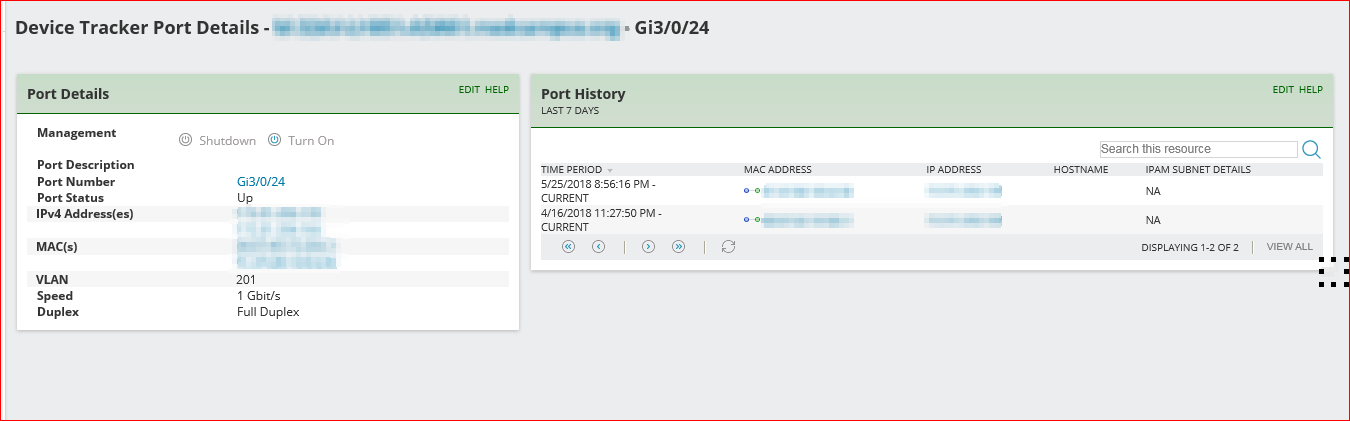
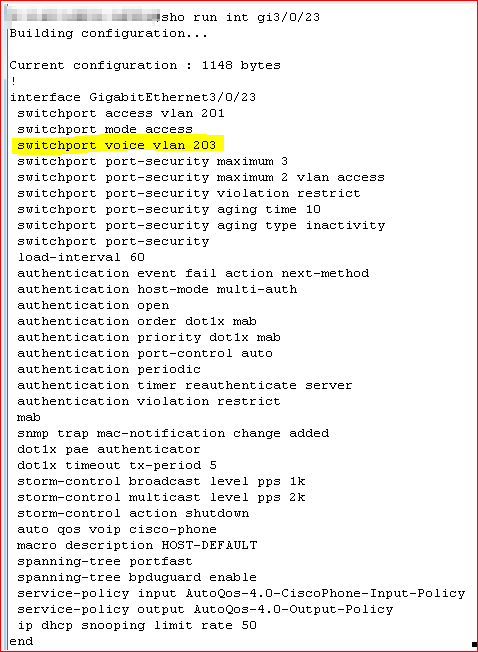
If the problem Zebra printer were plugged into the example to the above left, the printer wouldn't work. If it were plugged into the example of the above right, it SHOULD work. And if it doesn't, I can proceed to other troubleshooting, without needing to waste time wondering if the port has already had the appropriate configuration applied to it.
With that option enabled, I can easily save seven steps of checking/troubleshooting and move on to other remediation steps.
It's not just for VoIP VLANs and Zebra printers, either. This option legs me check that EVERYTHING that should be present on that port's configuration IS present. Or is NOT present. For example, I can quickly and easily see if the port is covered by ISE enforcement mode, which might be a reason why a device isn't working properly on the network. I can also see if the port-security settings are enabled and set to the expected limits, or if they're not.
Suggestion 1:
Is Solarwinds Orion UDT integrated well enough with NCM to be able to access this information, right from NCM, and display it within the UDT search output window? If so, here's your official Feature Request to make this functionality available. If not, UDT and NCM would be that much more valuable to us if they DID interact that well together.
Suggestion 2:
And even if UDT can't pull this information from NCM, I bet you can put a link into UDT that would point directly at the NCM running-configs for the switch hosting the device UDT found. Just being able to click on that link and going to the running-config would be a help.
Suggestion 3:
Finally, if neither of those options is feasible, could you insert an SSH link into UDT that points at the switch hosting the MAC address found by UDT? It's not much, but it's more convenient than nothing at all.
Swift packets!
Rick Schroeder
