Hi Everyone,
I thought I would post the latest version of the notifications that I use for notifications that is sent to MS Teams.
Node DOWN
This Json code is useful to send for a down node notification to an MS Teams:
{
    "summary": "Card \"Down Node Notification\"",
    "themeColor": "0078D7",
    "title": "ALERT TRIGGER: ${N=SwisEntity;M=Caption} is currently ${N=SwisEntity;M=Status}",
    "sections": [
    {
        "activityTitle": "[${N=SwisEntity;M=Caption}](${N=SwisEntity;M=DetailsUrl}) (${N=SwisEntity;M=IP_Address})",
        "activitySubtitle": "${N=Alerting;M=AlertTriggerTime;F=DateTime}",
        "activityImage": "https://upload.wikimedia.org/wikipedia/commons/0/0e/Basic_red_dot.png",
        "facts": [
          {
            "name": "Customer:",
            "value": "${N=SwisEntity;M=CustomProperties.HigherHealthAuthority}"
          },
          {
            "name": "Site",
            "value": "${N=SwisEntity;M=CustomProperties.SiteName},  ${N=SwisEntity;M=CustomProperties.Address_PostCode}"
          },
          {
            "name": "Vendor:",
            "value": "${N=SwisEntity;M=Vendor}"
          },
          {
            "name": "Device Model:",
            "value": "${N=SwisEntity;M=MachineType}"
          }
             ],
          "text": "[[ALERT DETAILS]](${N=Alerting;M=AlertDetailsUrl})  [[ACKNOWLEDGE THIS ALERT]](${N=Alerting;M=AcknowledgeLink})",
     }
    ],
}
This is how it would look in MS Teams, please note that some information on here is blurred out:
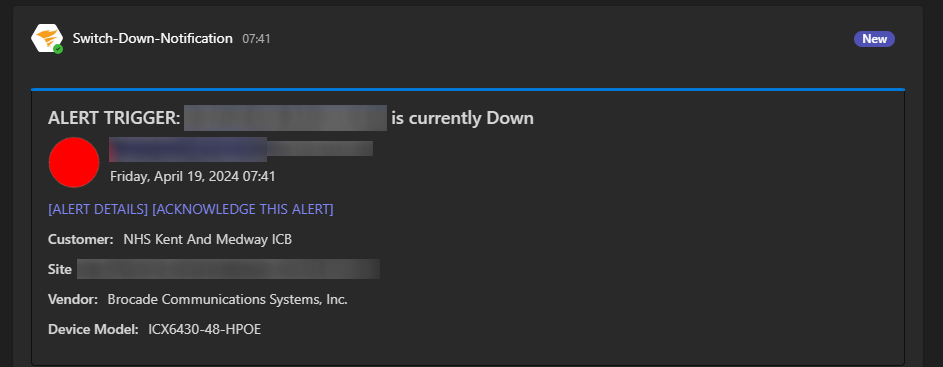
The additional feature on this code is that it allows you to customise the pop up notification by editing this line:
"summary": "Card \"Down Node Notification\"",Of course you could add ${N=SwisEntity;M=Caption} to this so that it will show what node has gone down.
Node UP
This Json code is useful to send for a UP node notification to an MS Teams:
{
  "summary": "Card \"Server Up Notification\"",
  "themeColor": "0078D7",
  "title": "ALERT TRIGGER: ${N=SwisEntity;M=Caption} is currently ${N=SwisEntity;M=Status}",
  "sections": [
    {
      "activityTitle": "[${N=SwisEntity;M=Caption}](${N=SwisEntity;M=DetailsUrl}) (${N=SwisEntity;M=IP_Address})",
      "activitySubtitle": "${N=Alerting;M=AlertTriggerTime;F=DateTime}",
      "activityImage": "https://upload.wikimedia.org/wikipedia/commons/6/6a/Green_Dot_(Active).png",
      "facts": [
        {
          "name": "Customer:",
          "value": "${N=SwisEntity;M=CustomProperties.HigherHealthAuthority}"
        },
        {
          "name": "Site",
          "value": "${N=SwisEntity;M=CustomProperties.SiteName},  ${N=SwisEntity;M=CustomProperties.Address_PostCode}"
        },
        {
          "name": "Vendor:",
          "value": "${N=SwisEntity;M=Vendor}"
        },
        {
          "name": "Device Model:",
          "value": "${N=SwisEntity;M=MachineType}"
        }
      ],
    }
  ],
}
Here is how the notification looks in MS Teams: